


DELL
DELL Latitude 5414 Rugged 14 laptop i7-6600U 32 GB DDR4 1TB SSD
A military-grade 14-inch laptop with a rugged chassis, Core i7-6600U processor, 32 GB DDR4 memory and a 1 TB SSD for reliable performance in harsh environments
- ColorBlack
- Operating SystemWindows 10
- CPU TypeIntel Core i7 6th Gen
- Processor NameIntel Core i7-6600U
- Turbo Frequency3.40 Ghz
- Number of CoresDual-core Processor
Options 32GB/1TB
- Military-grade chassis withstands harsh environments and drops
- Intel Core i7-6600U dual-core reaches 3.40 GHz turbo speed
- 32 GB DDR4 memory handles heavy multitasking smoothly
- 1 TB SSD provides fast storage for large files
- 0-inch HD display readable in direct sunlight
Built for Harsh Environments
The Dell Latitude 5414 Rugged is a 14.0-inch laptop engineered to withstand tough conditions with military-grade testing. It runs on a 6th Gen Intel Core i7-6600U dual-core processor with a turbo frequency of 3.40 GHz. The system includes 32 GB of DDR4 memory and a 1 TB SSD for fast storage. Integrated Intel HD Graphics 520 drives the 1366 x 768 HD non-touch display.
Field Workers and Outdoor Use
This machine suits professionals who need reliable operation in dust, vibration, or direct sunlight where standard laptops fail. The rugged chassis and qualified components support extended shifts away from a desk. Buyers who need a high-resolution touchscreen or discrete graphics for creative work should look elsewhere. The integrated GPU and HD panel limit visual detail and rendering power.
Connectivity and Expansion Options
Four USB ports (three 3.0, one 2.0) plus HDMI and VGA outputs allow multiple peripherals and external displays. An SD card reader and RJ-45 jack provide direct media access and wired networking. Intel Dual Band Wireless 802.11ac with Bluetooth keeps the unit linked in the field. The DVD drive and webcam add legacy media support and video conferencing without extra dongles.
商品特色
- Military-grade chassis withstands harsh environments and drops
- Intel Core i7-6600U dual-core reaches 3.40 GHz turbo speed
- 32 GB DDR4 memory handles heavy multitasking smoothly
- 1 TB SSD provides fast storage for large files
- 0-inch HD display readable in direct sunlight
商品規格
| Brand | DELL |
|---|---|
| Series | Rugged 14 |
| Model | Latitude |
| Part Number | 5414 |
| Color | Black |
| Operating System | Windows 10 |
| CPU Type | Intel Core i7 6th Gen |
| Processor Name | Intel Core i7-6600U |
| Turbo Frequency | 3.40 Ghz |
| Number of Cores | Dual-core Processor |
| CPU L2 Cache | 4MB |
| Screen Size | 14.0" |
| Touchscreen | Non-Touch Screen |
| Display Type | HD |
| Resolution | 1366 x 768 |
| GPU/VPU | Intel HD Graphics 520 |
| Graphic Type | Integrated Card |
| SSD | 1TB |
| HDD | No |
| Storage Spec | 1TB SSD |
| Memory | 32GB |
| Memory Speed | DDR4 |
| Memory Spec | 16 GB x 2 |
| Memory Slot (Total) | 2 |
| Memory Slot (Available) | 0 |
| Max Memory Supported | 32 GB |
| Optical Drive Type | DVD-ROM |
| LAN | 10/100/1000Mbps |
| WiFi Generation | Wi-Fi 4 and earlier generation |
| Bluetooth | Yes |
| USB | 2 x USB 3.0, USB 3.0 (PowerShare). 2 x USB 2.0 |
| Video Port | 1 x VGA, 1 x HDMI |
| HDMI | 1 x HDMI |
| Audio Ports | 1 x Microphone Jack, 1 x Headphone Jack |
| Audio | Integrated Sound card |
| Speaker | Internal Speakers |
| Touchpad | Yes |
| Keyboard | Standard |
| Backlit Keyboard | OPTION |
| Webcam | Yes |
| Card Reader | Micro SD |
| Style | Standard |
| Type | Work / Business |
| Usage | Business |
| AC Adapter/Charger | 65-watt AC Adapter |
| Dimensions (W x D x H) | 13.7 x 9.6 x 1.7 |
| Weight | 6 - 6.9 lbs. |
其他版本
同系列還有 5 款
同系列產品,記憶體、散熱器或時脈不同 — 下單前請先比較。


DELL
DELL Latitude 5414 Rugged 14.0" Touchscreen i7-6600U 8GB DDR4 1TB SSD
- Black
- Windows 10
US$605.99
0.00782609BTC
現貨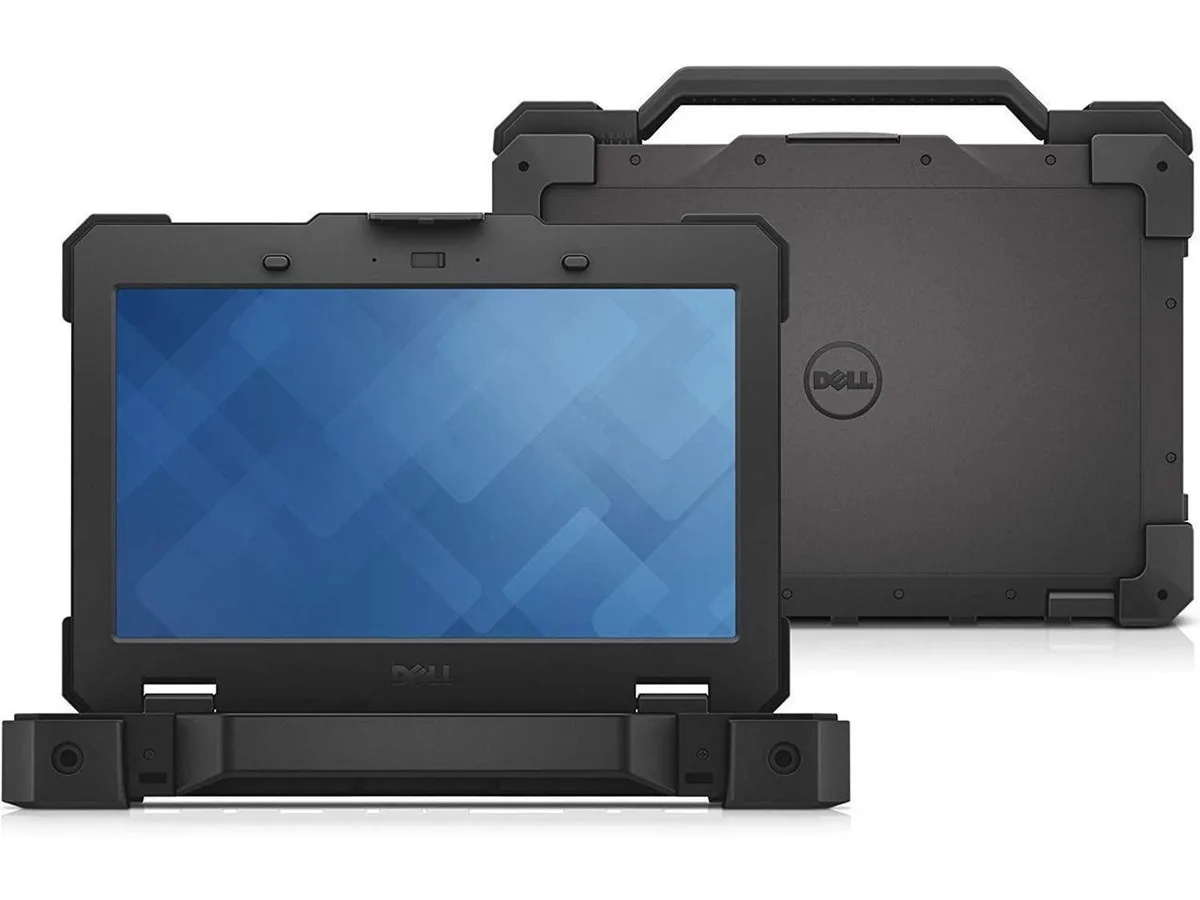
DELL
DELL Latitude 5414 Rugged 14 laptop i7-6600U 16GB 1TB SSD
- Black
- Windows 10
US$608.99
0.00786484BTC
現貨
DELL
DELL Latitude 5414 Rugged 14.0" Touchscreen i7-6600U 32GB 1TB SSD
- Black
- Windows 10
US$613.99
0.00792941BTC
現貨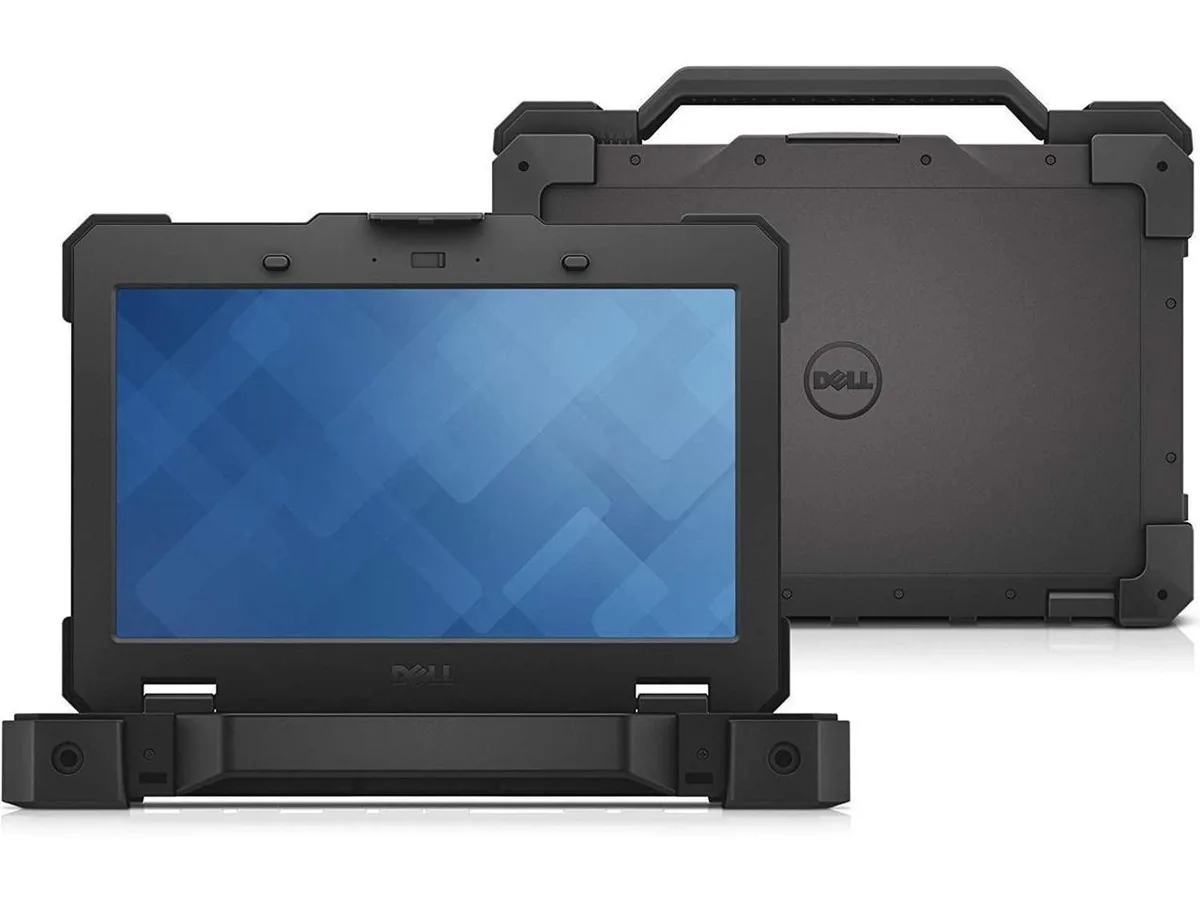
DELL
DELL Latitude Rugged 5414 14.0" Touch i7-6600U 32 GB 1TB SSD
- Black
- Windows 10
US$726.99
0.00938875BTC
現貨商品問答
What display connectors do I need on my external monitor to use the HDMI and VGA outputs on the Latitude 5414?
The laptop provides one HDMI port and one VGA port, so your monitor must accept an HDMI cable or a VGA cable for video input.
Will the three USB 3.0 ports on the 5414 run my older USB 2.0 flash drives and mouse at full 2.0 speed?
Yes, each USB 3.0 port is backward compatible and will operate USB 2.0 devices at their normal 2.0 transfer rate.
How can I confirm the 1 TB SSD is recognised and set as the boot drive after the first Windows 10 start-up?
Open File Explorer and verify that drive C: shows roughly 1 TB of total space, then check BIOS to confirm the SSD appears first in the boot order.
同類商品
顧客也比較過
同一分類,同一套結帳流程 — 支援八種加密貨幣,匯率鎖定 30 分鐘。


Microsoft
Microsoft Surface 3 1657 128GB CRB 2-in-1 laptop
- Silver
- Windows 10 Pro
US$244.99
0.00316394BTC
現貨
Microsoft
Microsoft Surface Pro FGG-2D-00001-RFB 2-in-1 laptop 16 GB 512 GB 12.0" touchscreen 2736 x 1824 refurbished
- 12.0"
- Touch Screen
US$687.99
0.00888509BTC
現貨
Lenovo
Lenovo Chromebook 500e Gen 5 M89 83TA0004US 12.2" MediaTek 8GB 64GB
- 12.2"
US$392.99US$420.99−7%
0.00507529BTC
現貨