

SanDisk
SanDisk Cruzer Blade 8 GB USB 2.0 USB flash drive Black SDCZ50-008G-B35
US$391.99
0.00501638BTC
現貨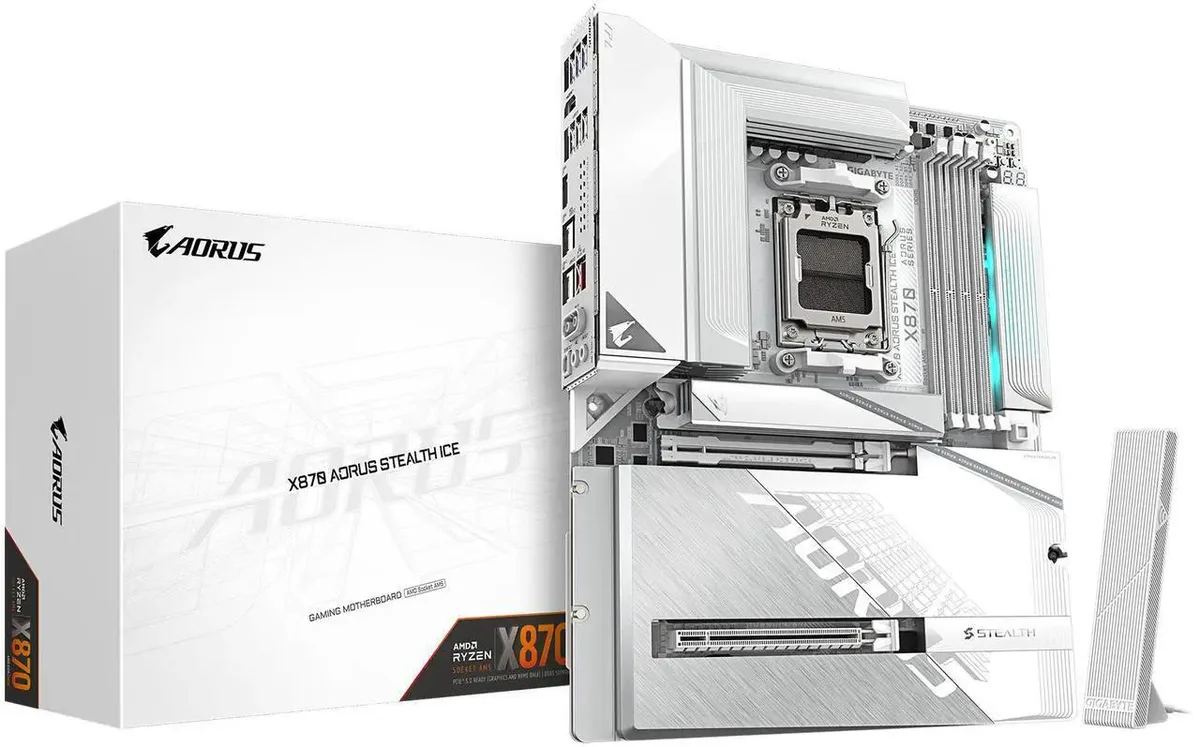


GIGABYTE
ATX motherboard for AMD Ryzen 9000, 8000 and 7000 CPUs with DDR5, four M.2 slots, PCIe 5.0, USB4, WIFI7 and 5 GbE LAN
The GIGABYTE X870 AORUS STEALTH ICE is an ATX board built for AMD Socket AM5 processors. It accepts Ryzen 9000, 8000 and 7000 series CPUs and provides four 288-pin DDR5 slots with a 256 GB maximum. The platform targets builders who need current-generation CPU support and high-speed memory in a standard form factor.
A 16+2+2 twin digital VRM design feeds the CPU while dedicated thermal guards cover the power circuitry and M.2 slots. The arrangement moves heat away from critical components during sustained workloads. No acoustic or power-draw figures are supplied by the manufacturer.
Four M.2 connectors are available, including one CPU-linked slot that runs at PCIe 5.0 x4 with Ryzen 9000 and 7000 processors. Additional slots operate at PCIe 4.0 speeds. This layout determines how many high-throughput drives can be installed without sharing bandwidth.
| Brand | GIGABYTE |
|---|---|
| Model | X870 AORUS STEALTH ICE |
| CPU Socket Type | AM5 |
| CPU Type | Ryzen Series |
| Chipset | AMD X870 |
| Number of Memory Slots | 4x288pin (DDR5) |
| Maximum Memory Supported | 256GB |
| Channel Supported | Dual Channel |
| ECC Supported | Non-ECC |
| Buffer Supported | Un-buffered |
| Memory Feature | Support for non-ECC Un-buffered DIMM 1Rx8/2Rx8/1Rx16 memory modules |
| PCI Express 5.0 x16 | 1 x PCI Express x16 slot (PCIEX16), integrated in the CPU: AMD Ryzen 9000/7000 Series Processors support PCIe 5.0 x16 mode AMD Ryzen 8000 Series-Phoenix 1 Processors support PCIe 4.0 x8 mode AMD Ryzen 8000 Series-Phoenix 2 Processors support PCIe 4.0 x4 mode |
| PCI Express x4 | 1 x PCI Express x16 slot, supporting PCIe 4.0 and running at x4 (PCIEX4) |
| M.2 | 1 x M.2 connector (M2A_CPU), integrated in the CPU, supporting Socket 3, M key, type 25110/22110/2580/2280 SSDs: AMD Ryzen 9000/7000 Series Processors support PCIe 5.0 x4/x2 SSDs AMD Ryzen 8000 Series-Phoenix 1 Processors support PCIe 4.0 x4/x2 SSDs AMD Ryzen 8000 Series-Phoenix 2 Processors support PCIe 4.0 x4/x2 SSDs 1 x M.2 connector (M2B_CPU), integrated in the CPU, supporting Socket 3, M key, type 22110/2280 SSDs: AMD Ryzen 9000/7000 Series Processors support PCIe 5.0 x4/x2 SSDs AMD Ryzen 8000 Series-Phoenix 1 Processors support PCIe 4.0 x4/x2 SSDs * The M2B_CPU connector become |
| SATA RAID | RAID 0, RAID 1, RAID 5, and RAID 10 support for NVMe SSD storage devices |
| Audio Channels | 7.1 Channels |
| Max LAN Speed | 5Gbps |
| Wireless LAN | Wi-Fi 802.11 ax |
| Bluetooth | BLUETOOTH 5.3 |
| Back I/O Ports | 1 x HDMI port (Note) 2 x antenna connectors (2T2R) 2 x USB4 USB Type-C ports (DisplayPort (Note)) 1 x USB Type-C header, with USB 3.2 Gen 2 support 2 x USB 3.2 Gen 2 Type-A ports (red) 4 x USB 3.2 Gen 1 ports 4 x USB 2.0/1.1 ports 1 x RJ-45 port 1 x optical S/PDIF Out connector 2 x audio jacks |
| Onboard USB | 1 x USB Type-C header, with USB 3.2 Gen 2x2 support 1 x USB 3.2 Gen 1 header 2 x USB 2.0/1.1 headers |
| Other Connectors | 1 x CPU fan header 1 x CPU fan/water cooling pump header 4 x system fan headers 2 x system fan/water cooling pump headers 3 x addressable RGB Gen2 LED strip headers 1 x RGB LED strip header 4 x M.2 Socket 3 connectors 2 x SATA 6Gb/s connectors 1 x front panel header 1 x front panel audio header 1 x noise detection header 1 x Trusted Platform Module header (For the GC-TPM2.0 SPI/GC-TPM2.0 SPI 2.0/GC-TPM2.0 SPI V2 module only) 1 x Q-Flash Plus button 1 x power button 1 x reset button 1 x reset jumper 2 x temperature sensor headers 1 x Clear CMOS jumper |
| Form Factor | ATX |
| Dimensions (W x L) | 12.0" x 9.6" |
| Power Pin | 1 x 24-pin ATX main power connector 1 x 8-pin ATX 12V power connector 1 x 4-pin ATX 12V power connector |
| BIOS Feature | 1 x 512 Mbit flash Use of licensed AMI UEFI BIOS PnP 1.0a, DMI 2.7, WfM 2.0, SM BIOS 2.7, ACPI 5.0 |
| Windows 11 | Supported |
| Features | Support for GIGABYTE Control Center (GCC) Support for Q-Flash Support for Q-Flash Plus Support for Smart Backup |
Place the Ryzen 7000/8000/9000 processor into the AM5 socket, align the triangle markers, lower the retention arm, and secure the lever — the step people miss is confirming the lever clicks fully locked before mounting the cooler.
The VRM and M.2 Thermal Guards are passive metal shields; they need no replacement, only occasional dust removal with compressed air to keep airflow clear over the four M.2 slots.
The VRM thermal limit is reached first during prolonged heavy current draw; the integrated heatsink dissipates heat but cannot increase its surface area, so temperatures plateau and may throttle the CPU.
同類商品
同一分類,同一套結帳流程 — 支援八種加密貨幣,匯率鎖定 30 分鐘。
您支付所用的幣種,以及查看價格所用的貨幣。
結帳時由您的錢包發送
僅供顯示 — 商品目錄以美元計價
查無符合的貨幣。
請選擇網站使用的語言。
查無符合的語言。
初次造訪?
已經有帳戶了嗎?
本店沒有自動重設密碼的機制:由於不寄送電子郵件,也就沒有一次性連結可供申請。只要將地址留在帳戶中,之後將由專人處理。
請求已收到
不會有任何郵件寄到您的信箱 — 本商店完全不寄送電子郵件。會有人親自處理這些申請。
想起來了嗎?



