

BFKK
BFKK 3U Rackmount Server Chassis EATX/ATX/MATX 4x5.25 6x3.5 Top/Side Cooling
- Rackmount
US$214.99
0.00266222BTC
現貨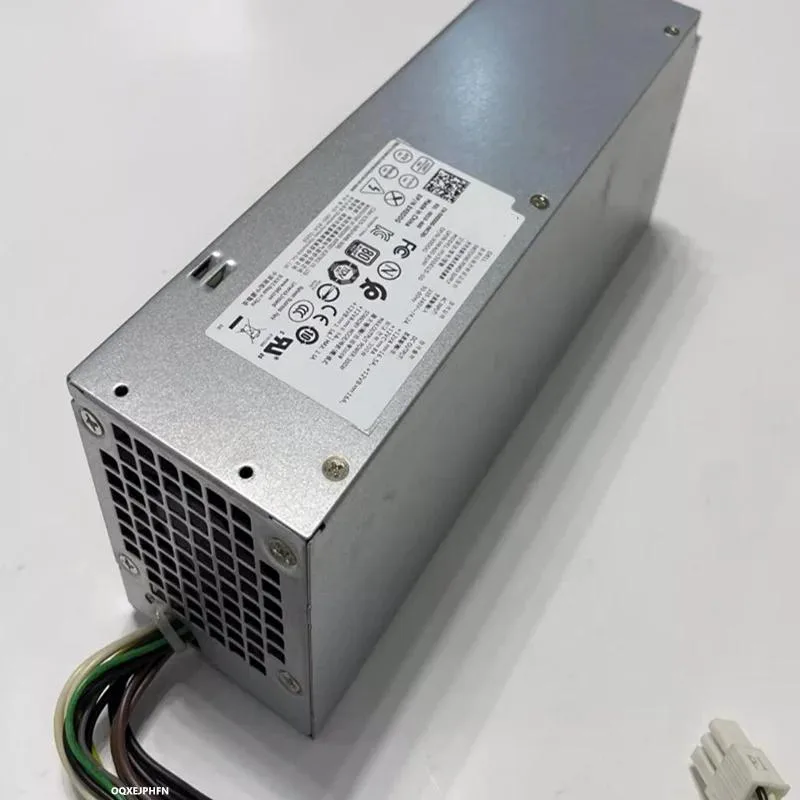
KHACHIMO
ATX power supply with model codes 3050 7050 5050 3668 3665 6Pin X0DDG 0X0DDG HU300EGS-00 HK400-81PP, 300 W output, 80 PLUS Gold efficiency, zero-RPM fan mode and Modern Standby compatibility
This 300W ATX unit targets builders who need fast wake-from-sleep performance and quiet operation. Gold-rated efficiency cuts power draw and heat, while the Zero RPM fan mode keeps noise near zero at typical desktop loads. The resonant LLC topology with DC-to-DC conversion delivers stable voltage rails and supports deep sleep states.
Suits compact or office builds that rely on Modern Standby and value silent idle behaviour. Builders who need more than 300W for discrete graphics cards or heavy multi-core workloads should look at higher-capacity units.
The 300W rating is the single figure that decides fit. If the total system draw under load stays below this limit, the supply will handle it with Gold efficiency and silent low-load operation.
| Type | ATX |
|---|
It follows the ATX form factor so it mounts in any standard ATX chassis, and the 6-pin connector listed is a peripheral power output, not a motherboard input.
Seat the PSU in the case first, then plug the 24-pin motherboard cable, the 8-pin CPU cable, and finally any 6-pin peripheral cables, making sure each latch clicks fully home.
Vacuum or blow out the fan grille once a year, or more often in dusty environments, so the fan can spin freely when loads rise above the Zero RPM threshold.
同類商品
同一分類,同一套結帳流程 — 支援八種加密貨幣,匯率鎖定 30 分鐘。
您支付所用的幣種,以及查看價格所用的貨幣。
結帳時由您的錢包發送
僅供顯示 — 商品目錄以美元計價
查無符合的貨幣。
請選擇網站使用的語言。
查無符合的語言。
初次造訪?
已經有帳戶了嗎?
本店沒有自動重設密碼的機制:由於不寄送電子郵件,也就沒有一次性連結可供申請。只要將地址留在帳戶中,之後將由專人處理。
請求已收到
不會有任何郵件寄到您的信箱 — 本商店完全不寄送電子郵件。會有人親自處理這些申請。
想起來了嗎?



