

EVESKY
EVESKY MW4500 Wireless Vertical Ergonomic Mouse 1200 DPI 6 Buttons
157.99 US$
0.00203485BTC
متوفرنقبل الدفع بالعملة المشفرة — لذلك يمكن للعملات الرقمية التي تملكها أن تشتري أجهزة حقيقية.ادفع بالعملة المشفرة، وأنفقها على أجهزة حقيقية. شحن مؤمن مجانا إلى كل أنحاء العالم لما يتجاوز 399 US$. صناديق شحن بسيطة بلا علامة تجارية، ترسل من ألمانيا.شحن مؤمن مجانا لما يتجاوز 399 US$. يُقفل سعرك لمدة 30 دقيقة بمجرد فتح صفحة الدفع.السعر مقفل لمدة 30 دقيقة. كل قطعة مختومة، ورقمها التسلسلي متحقق منه، ومشمولة بضمان 24 شهرا.مختوم، وبضمان 24 شهرا.
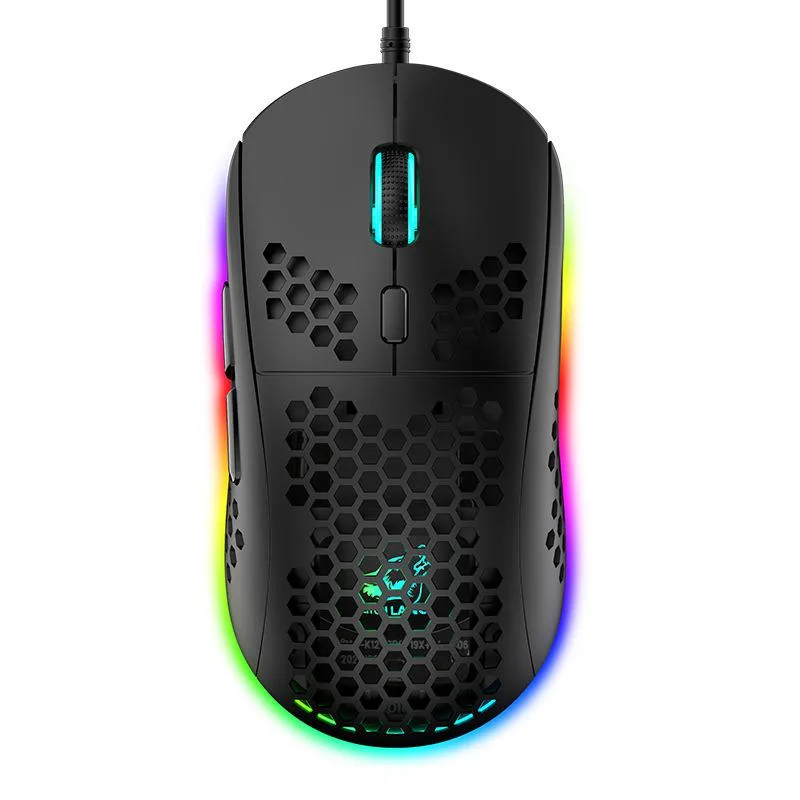


SPTUO
Lightweight honeycomb-shell wired mouse with six DPI steps up to 6400 and 16-million-colour RGB lighting
The SPTUO M8 is a wired gaming mouse built around a hollow honeycomb shell that reduces weight and improves airflow during long sessions. It connects through a 1.7 m USB cable and works with Windows, macOS and iOS systems without extra drivers.
The open honeycomb structure lets heat escape naturally so the surface stays comfortable during extended use. As a wired USB device it draws power directly from the host port, eliminating battery concerns and keeping latency consistent.
The optical sensor offers six fixed steps from 800 to 6400 DPI, selectable through a dedicated button for quick sensitivity changes. Buyers who need on-the-fly software profiles or wireless freedom should look elsewhere.
| Color | Black |
|---|
Plug the 1.7 m USB cable into a free port; the step people miss is pressing the DPI button to cycle through 800, 1600, 2400, 3200, 4800 and 6400 DPI for their preferred sensitivity.
Wipe the ABS honeycomb shell with a dry cloth to remove dust from the openings; no internal lubrication or part replacement is required.
The fixed 1.7 m cable length restricts movement before any sensor or button limit is reached.
أيضًا في هذا القسم
نفس القسم، ونفس صفحة الدفع — ثماني عملات رقمية وقفل سعر لمدة 30 دقيقة.
ما تدفعه، وما تُعرض به الأسعار.
يُرسَل من محفظتك عند إتمام الطلب
للعرض فقط — أسعار الكتالوج بالدولار الأمريكي
لا توجد عملة مطابقة.
اختر اللغة التي يخاطبك بها الموقع.
هل أنت جديد هنا؟
لديك حساب بالفعل؟
لا توجد إعادة تعيين تلقائية: هذا المتجر لا يُرسل أي بريد، فلا يوجد رابط لمرة واحدة يمكن طلبه. اترك العنوان في الحساب، وسيُعالَج الأمر يدويًا.
تم تسجيل الطلب
لا شيء في طريقه إلى بريدك الوارد — هذا المتجر لا يُرسل أي بريد إطلاقًا. يتولّى أحدهم معالجة هذه الطلبات يدويًا.
تذكّرتها؟


