Cherry
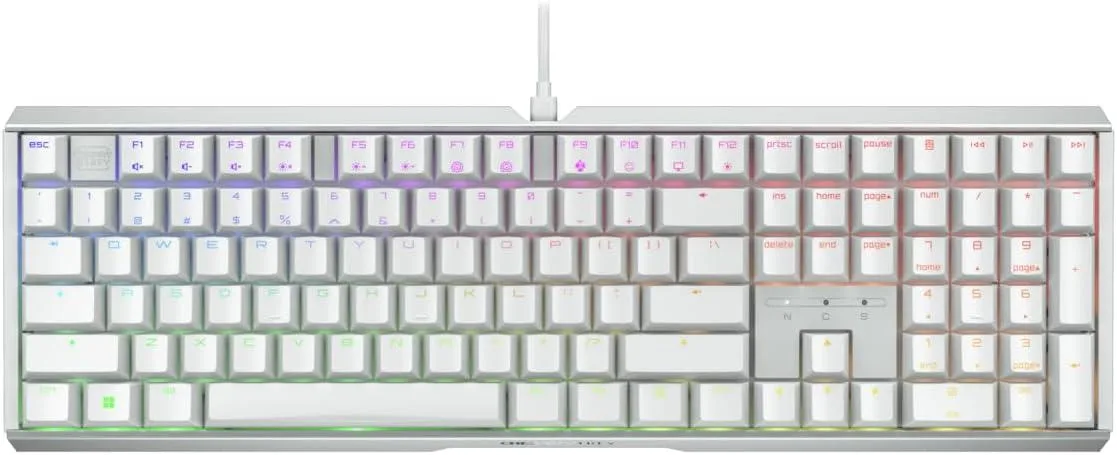
Cherry MX 3.1 Mechanical Wired Gaming Keyboard White MX2A Silent Red
- Red Switch
- White
116,99 US$
0.00145293BTC
En stockAceptamos criptomonedas — así, las criptos que usted tiene pueden comprar hardware real.Pague en cripto y gástela en hardware real. Envío asegurado gratis a nivel mundial a partir de $399. Cajas neutras, sin marca, enviadas desde Alemania.Envío asegurado gratis a partir de $399. Su cotización queda bloqueada 30 minutos en cuanto se abre el pago.Cotización bloqueada 30 minutos. Todos los artículos vienen sellados, con el número de serie verificado y cubiertos por una garantía de 24 meses.Sellado, con 24 meses de garantía.


Cherry
A mechanical gaming keyboard with new MX2A Red linear switches and a white aluminium frame
Key Switch Type Red Cherry MX
The CHERRY XTRFY MX 3.1 keyboard combines an aluminium housing with vibrant RGB lighting and new MX2A Red linear switches. A noise-damping structure reduces keystroke sound for a cleaner feel during play. The white finish suits bright desk setups. Wired connectivity ensures consistent response.
The keyboard draws minimal power over its wired USB connection and produces no measurable heat during typical gaming sessions. Acoustic output stays low thanks to the integrated damping layer and linear switch design. No active cooling is required. Fanless operation keeps the desk silent.
| Key Switch | Red Cherry MX |
|---|---|
| Keyboard Color | White |
Otras versiones de este modelo
Misma familia, con memoria, disipador o frecuencia diferentes — compare antes de decidirse.
Plug the USB cable into a free port on your PC; the keyboard is recognised automatically, but remember to install the CHERRY UTILITY software if you want to customise RGB lighting or remap keys.
The MX2A Red switches are rated for a very long lifespan; if a key starts to chatter or feels inconsistent, that individual switch can be desoldered and swapped without replacing the whole board.
También en este pasillo
Mismo estante, mismo pago — ocho criptomonedas y un tipo de cambio bloqueado 30 minutos.
Lo que usted paga, y la moneda en la que lee los precios.
Se envía desde su billetera al finalizar la compra
Solo informativo — el catálogo está en dólares
Ninguna moneda coincide.
Elija el idioma en el que el sitio le habla.
¿Es nuevo aquí?
¿Ya tiene una?
No existe ningún restablecimiento automático: esta tienda no envía correos electrónicos, así que no hay ningún enlace de un solo uso que solicitar. Deje la dirección asociada a la cuenta y se atenderá de forma manual.
Solicitud registrada
No hay nada de camino a su bandeja de entrada: esta tienda no envía correos en absoluto. Alguien se encarga de esto manualmente.
¿La recordó?