Cherry
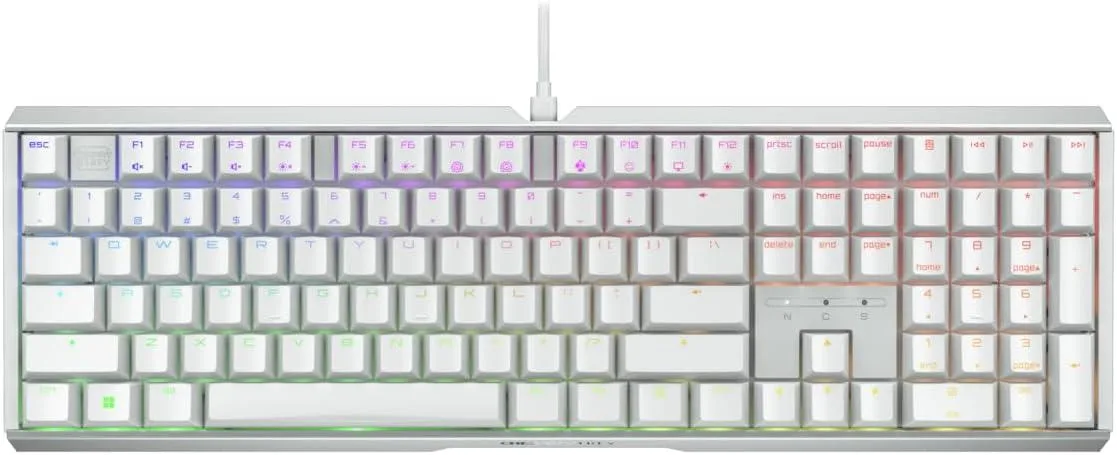
Cherry MX 3.1 Mechanical Wired Gaming Keyboard White MX2A Silent Red
- Red Switch
- White
$116.99
0.00145568BTC
In stockWe take cryptocurrency — so the coins you hold can buy real hardware.Pay in crypto, spend it on real hardware. Free insured shipping worldwide over $399. Plain, unbranded boxes, sent from Germany.Free insured shipping over $399. Your rate is locked for 30 minutes once checkout opens.Rate locked 30 minutes. Every item sealed, serial-checked and covered by a 24-month warranty.Sealed, 24-month warranty.


Cherry
A mechanical gaming keyboard with new MX2A Red linear switches and a white aluminium frame
Key Switch Type Red Cherry MX
The CHERRY XTRFY MX 3.1 keyboard combines an aluminium housing with vibrant RGB lighting and new MX2A Red linear switches. A noise-damping structure reduces keystroke sound for a cleaner feel during play. The white finish suits bright desk setups. Wired connectivity ensures consistent response.
The keyboard draws minimal power over its wired USB connection and produces no measurable heat during typical gaming sessions. Acoustic output stays low thanks to the integrated damping layer and linear switch design. No active cooling is required. Fanless operation keeps the desk silent.
| Key Switch | Red Cherry MX |
|---|---|
| Keyboard Color | White |
Other versions of this model
Same family, different memory, cooler or clock — compare before you commit.
Plug the USB cable into a free port on your PC; the keyboard is recognised automatically, but remember to install the CHERRY UTILITY software if you want to customise RGB lighting or remap keys.
The MX2A Red switches are rated for a very long lifespan; if a key starts to chatter or feels inconsistent, that individual switch can be desoldered and swapped without replacing the whole board.
Also in this aisle
Same shelf, same checkout — eight coins and a 30-minute rate lock.
What you pay in, and what you read prices in.
Sent from your wallet at checkout
Display only — the catalogue is priced in USD
No currency matches that.
Pick the language the site speaks to you in.
New here?
Already have one?
There is no automatic reset: this shop sends no mail, so there is no one-time link to ask for. Leave the address on the account and it gets picked up by hand.
Request noted
Nothing is on its way to your inbox — this shop sends no mail at all. Someone picks these up by hand.
Remembered it?