

SanDisk
SanDisk Cruzer Blade 8 GB USB 2.0 USB flash drive Black SDCZ50-008G-B35
US$391.99
0.00502487BTC
재고 있음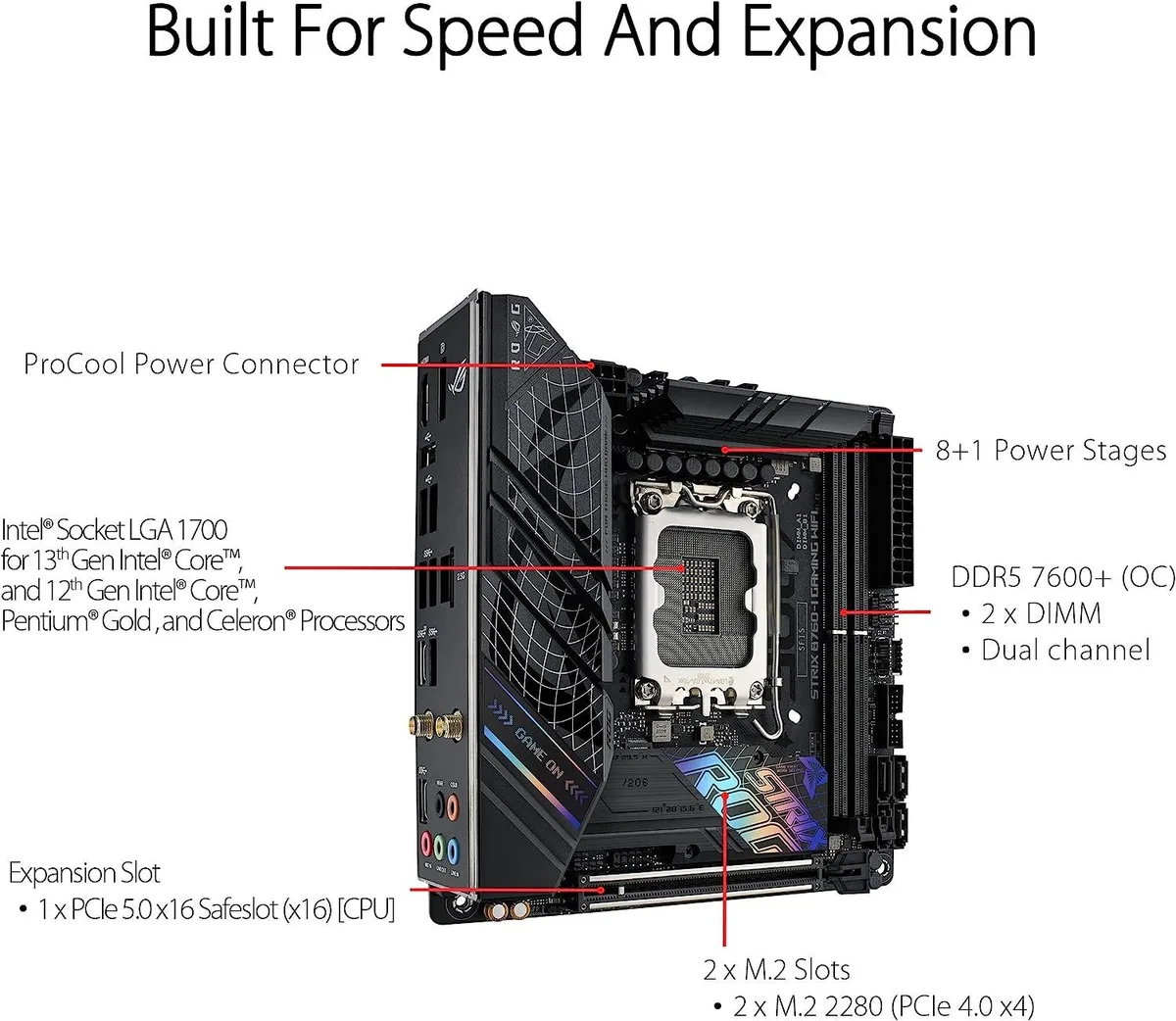


ASUS
LGA 1700 MicroATX board with DDR5 memory support, PCIe 5.0 x16 slot and two M.2 slots
The ASUS ROG Strix B760-I Gaming WiFi is a MicroATX board built for Intel LGA 1700 processors and DDR5 memory. It includes a PCI Express 5.0 x16 slot and two M.2 slots alongside the I/O shield. This configuration suits compact desktop builds that require modern memory and high-speed expansion.
This board fits builders who want a MicroATX layout with DDR5 support and a single top-tier graphics slot. It is not for users who need more than two M.2 slots or additional full-length PCIe slots beyond the primary x16 connection.
The CPU socket is LGA 1700, which determines processor compatibility. Verify your chosen processor against the manufacturer's CPU compatibility list before purchase to confirm support and any BIOS update requirements.
| Brand | ASUS |
|---|---|
| CPU Socket Type | LGA 1700 |
| CPU Type | LGA 1700 |
| Memory Standard | DDR5 |
| Form Factor | MicroATX |
The board uses the MicroATX form factor with standard mounting holes, so any case that supports MicroATX will fit it.
The I/O shield snaps into the case rear cut-out before the motherboard is lowered in; the common mistake is mounting the board first and then realising the shield is still on the bench.
The two M.2 slots each use a small standoff and screw that can be lost during drive swaps; DDR5 modules have no moving parts and only need occasional dust removal.
이 진열대의 다른 상품
같은 진열대, 같은 체크아웃 — 코인 8종, 환율 잠금 30분.
결제할 코인과 가격을 확인할 통화입니다.
체크아웃 시 지갑에서 전송됩니다.
표시 전용 — 카탈로그 가격은 달러 기준입니다.
일치하는 통화가 없습니다.
사이트에서 사용할 언어를 선택하십시오.
일치하는 언어가 없습니다.
처음 방문하셨나요?
이미 계정이 있으신가요?
자동 재설정 기능은 없습니다. 이 쇼핑몰은 어떠한 메일도 보내지 않으므로 요청할 일회용 링크 자체가 없습니다. 계정에 등록된 이메일 주소를 그대로 두시면 담당자가 직접 확인해 처리합니다.
요청 접수
받은편지함으로 오는 것은 아무것도 없습니다 — 이 쇼핑몰은 메일을 전혀 보내지 않습니다. 담당자가 직접 확인해 처리합니다.
기억나셨나요?



