DELL
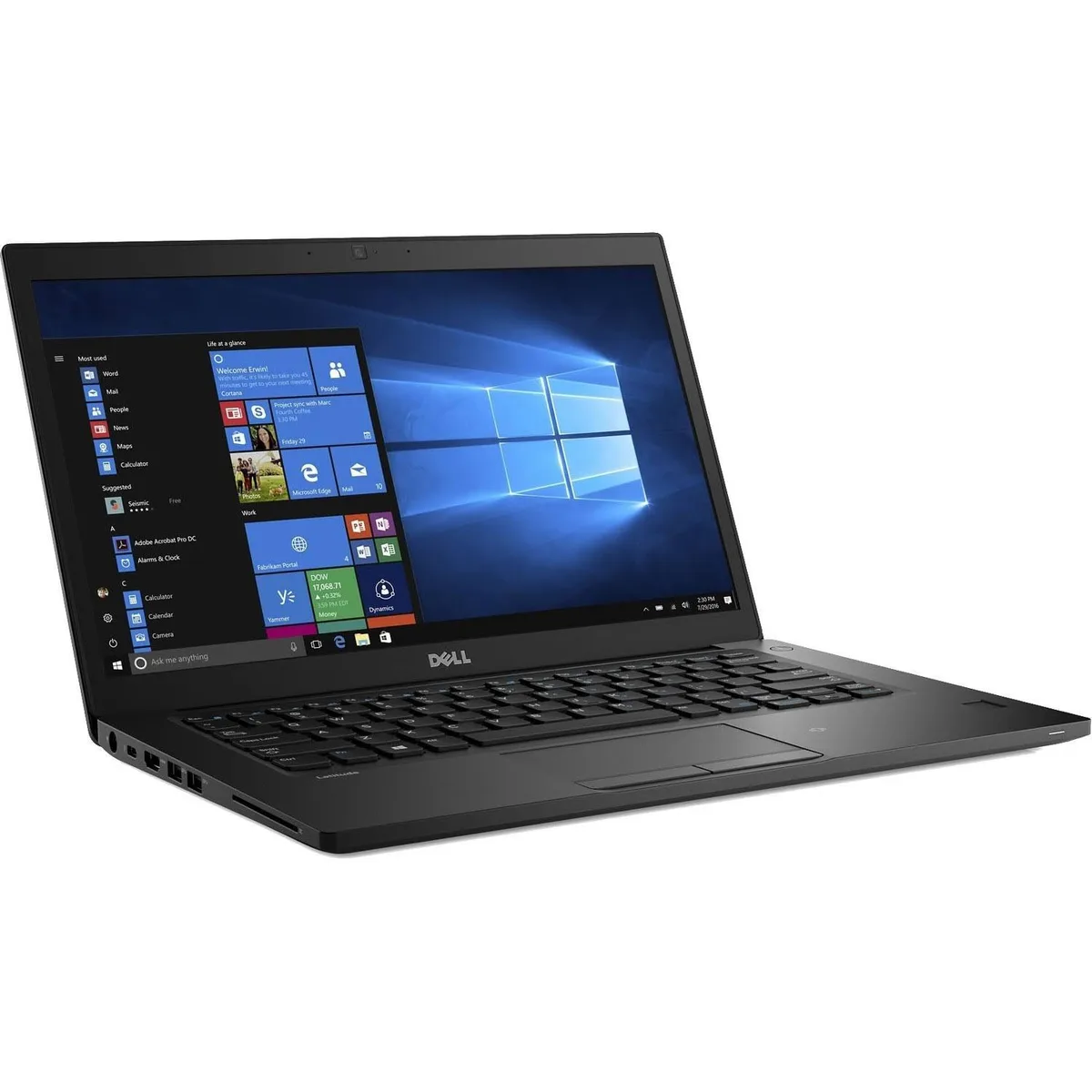
DELL Latitude 7480 14" FHD i7-6600U 16GB 1TB SSD 8GB DDR4
- Black
- Windows 11 Pro
$370.99
0.00471649BTC
In stockWe take cryptocurrency — so the coins you hold can buy real hardware.Pay in crypto, spend it on real hardware. Free insured shipping worldwide over $399. Plain, unbranded boxes, sent from Germany.Free insured shipping over $399. Your rate is locked for 30 minutes once checkout opens.Rate locked 30 minutes. Every item sealed, serial-checked and covered by a 24-month warranty.Sealed, 24-month warranty.


DELL
A 14-inch FHD business ultrabook with 32 GB DDR4 memory, 1 TB SSD storage, Intel Core i7-6600U processor and Windows 10 Pro
Options 32GB/1TB W10P
The Dell Latitude 7480 is a 14-inch ultrabook built around a 6th generation Intel Core i7-6600U dual-core processor with 4MB cache and a base clock of 2.6GHz. It ships with 32GB of DDR4 memory and a 1TB SSD, running Windows 10 Pro. The non-touch FHD display resolves 1920 x 1080 and includes an integrated webcam for video calls.
Under continuous load the dual-core CPU can reach 3.4GHz while the Intel HD Graphics 520 handles visual output without a discrete GPU. The 32GB DDR4 configuration keeps multiple business applications and browser tabs responsive. Wireless connectivity uses 802.11ac and Bluetooth 4.2 for stable peripheral and network links during long sessions.
A magnesium-alloy unibody finished in soft-touch paint weighs 3.01lbs and resists flex during daily transport. Video is routed through full-size HDMI and DisplayPort via USB-C, allowing dual-monitor setups without docks. The anti-glare screen coating reduces reflections in bright offices, while the bottom-load keyboard layout supports comfortable typing on cramped tray tables.
| Brand | DELL |
|---|---|
| Series | 7000 |
| Model | Latitude |
| Part Number | 7480 |
| Color | Black |
| Operating System | Windows 10 |
| CPU Type | Intel Core i7 6th Gen |
| Processor Name | Intel Core i7-6600U |
| Number of Cores | Dual-core Processor |
| CPU L2 Cache | 4MB |
| Screen Size | 14.0" |
| Touchscreen | Non-Touch Screen |
| Display Type | FHD |
| Resolution | 1920 x 1080 |
| GPU/VPU | Intel HD Graphics 520 |
| Graphic Type | Integrated Card |
| SSD | 1TB |
| HDD | No |
| Storage Spec | 1TB SSD |
| Memory | 32GB |
| Memory Speed | DDR4 |
| Memory Spec | 16 GB x 2 |
| Memory Slot (Total) | 2 |
| Memory Slot (Available) | 0 |
| Max Memory Supported | 32 GB |
| Optical Drive Type | No |
| LAN | 10/100/1000Mbps |
| WiFi Generation | Wi-Fi 4 and earlier generation |
| Bluetooth | Yes |
| USB | 2 x USB 3.0, 1 x USB 3.0 (PowerShare), 1 x USB- C/DisplayPort |
| Thunderbolt | 1 x Thunderbolt |
| Video Port | 1 x HDMI (supports Thunderbolt/DisplayPort Alt Mode) |
| HDMI | 1 x HDMI |
| Audio Ports | 1 x Microphone Jack, 1 x Headphone Jack |
| Audio | Integrated Sound card |
| Touchpad | Yes |
| Keyboard | Standard |
| Webcam | Yes |
| Style | Ultrabook |
| Type | Mainstream |
| Usage | Consumer |
| AC Adapter/Charger | 65-watt AC Adapter |
| Weight | 3 - 3.9 lbs. |
Other versions of this model
Same family, different memory, cooler or clock — compare before you commit.
The dual-core Intel Core i7-6600U operates at a 2.6GHz base frequency and can reach 3.4GHz turbo. Integrated Intel HD Graphics 520 shares the thermal envelope, so sustained loads are handled by the ultrabook cooling design without a discrete GPU adding extra heat.
The laptop provides video over USB-C using DisplayPort alternate mode. A USB-C to DisplayPort cable or a USB-C to HDMI adapter will drive an external screen; the full-size HDMI port is also available for a direct connection.
The system uses DDR4 SODIMM memory and supports up to 32GB total. Since 32GB is already fitted, the slots are fully populated, so additional modules would require removing the existing ones rather than adding alongside them.
Also in this aisle
Same shelf, same checkout — eight coins and a 30-minute rate lock.
What you pay in, and what you read prices in.
Sent from your wallet at checkout
Display only — the catalogue is priced in USD
No currency matches that.
Pick the language the site speaks to you in.
New here?
Already have one?
There is no automatic reset: this shop sends no mail, so there is no one-time link to ask for. Leave the address on the account and it gets picked up by hand.
Request noted
Nothing is on its way to your inbox — this shop sends no mail at all. Someone picks these up by hand.
Remembered it?