HP
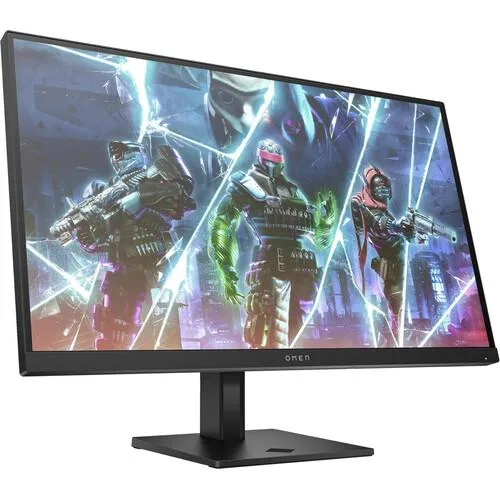
HP OMEN 27qz 27" 165Hz WQHD IPS gaming monitor
A 27-inch IPS gaming monitor with 165Hz refresh rate, 1ms GtG response time, WQHD 2560 x 1440 resolution, 99% sRGB and 95% DCI-P3 colour coverage, HDR 400 nits brightness, AMD FreeSync.
- Screen Size27"
- Fluid competitive gameplay backed by 165 Hz refresh rate
- Sharp detail on 27" WQHD 2560 x 1440 panel
- True-to-life colour with 99 % sRGB and 95 % DCI-P3
- Smooth tear-free action via 1 ms GtG response and AMD FreeSync
- Broad console and PC connectivity validated by 140 compatibility tests
Competitive gaming display
The 27 inch OMEN 27qz targets players who need a 165 Hz refresh rate and 1 ms GtG response time for fast-paced titles. Its WQHD resolution of 2560 x 1440 delivers sharp detail on an IPS panel with wide viewing angles. The monitor covers 99 percent sRGB and 95 percent DCI-P3 for accurate colour work. It is not suited for buyers who want 4K pixel density or higher refresh rates.
Straightforward PC and console setup
Two HDMI ports and one DisplayPort allow quick switching between a computer and consoles without cable swapping. The unit has passed over 140 compatibility tests to reduce connection issues. AMD FreeSync support helps eliminate tearing when paired with a compatible graphics card. Builders who require USB-C video input or built-in KVM switching will need a different model.
WQHD panel limits at 165 Hz
The 2560 x 1440 resolution balances detail and GPU load but cannot match 4K sharpness for media editing. HDR brightness peaks at 400 nits, which meets entry-level HDR400 requirements but falls short of brighter HDR standards. The 165 Hz ceiling is fixed; the panel does not support overclocking beyond that rate. Users needing higher dynamic range or faster motion clarity should consider other options.
Highlights
- Fluid competitive gameplay backed by 165 Hz refresh rate
- Sharp detail on 27" WQHD 2560 x 1440 panel
- True-to-life colour with 99 % sRGB and 95 % DCI-P3
- Smooth tear-free action via 1 ms GtG response and AMD FreeSync
- Broad console and PC connectivity validated by 140 compatibility tests
Specifications
| Screen Size | 27" |
|---|
Questions about this item
How can I verify the 165 Hz refresh rate is active after setup?
Open the OSD menu using the monitor buttons and confirm the refresh rate reads 165 Hz; then check your GPU control panel to ensure 165 Hz is selected for the DisplayPort or HDMI input.
Which cables are included and what must I buy separately?
The monitor ships with a power cable and at least one video cable (typically DisplayPort or HDMI); if your setup needs a second HDMI for a console, purchase an extra HDMI cable.
Should I choose this 27-inch WQHD model or a different capacity?
This is the only capacity offered — a 27-inch panel at 2560 × 1440 resolution with 165 Hz, 1 ms GtG, 99 % sRGB, 95 % DCI-P3 and 400 nits brightness.
Also in this aisle
People compared these
Same shelf, same checkout — eight coins and a 30-minute rate lock.