


MSI
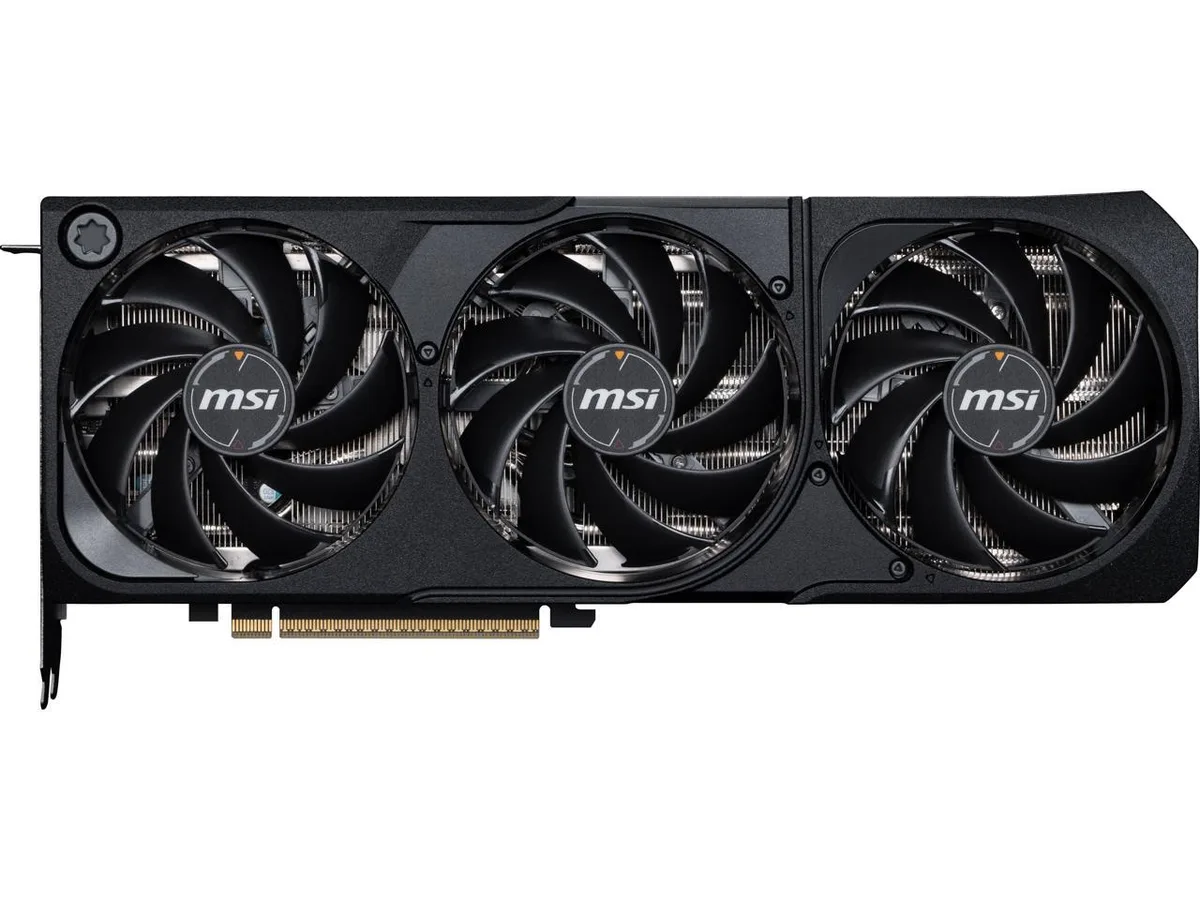
MSI RTX 5080 16G SHADOW 3X OC graphics card
GeForce RTX 5080 graphics card with 16 GB GDDR7 memory, 10752 CUDA cores and a 2640 MHz boost clock
- InterfacePCI Express 5.0
- Chipset ManufacturerNVIDIA
- GPU SeriesNVIDIA GeForce RTX 50 Series
- GPUGeForce RTX 5080
- Boost Clock2640 MHz
- CUDA Cores10752
Edition SHADOW 3X OC
- SUPRIM LIQUID SOC
- SUPRIM SOC
- VANGUARD SOC LAUNCH EDITION
- VANGUARD SOC
- GAMING TRIO OC WHITE
- GAMING TRIO OC
- INSPIRE 3X OC
- VENTUS 3X OC PLUS
- VENTUS 3X OC
- VENTUS 3X
- SHADOW 3X OC
Struck-through versions exist but are not stocked here.
- 16GB GDDR7 memory with 256-bit bus delivers high bandwidth for 4K gaming
- Boost clock reaches 2640 MHz for responsive frame rates in demanding titles
- 10752 CUDA cores provide parallel compute power for ray tracing and AI workloads
- PCI Express 5.0 interface enables faster data transfer between GPU and system
- HDMI 2.1b and three DisplayPort 2.1b outputs support up to four high-refresh displays
MSI RTX 5080 SHADOW 3X OC
This graphics card uses the NVIDIA GeForce RTX 5080 GPU with 16GB of GDDR7 memory on a 256-bit interface. It connects via PCI Express 5.0 and reaches a boost clock of 2640 MHz. The board includes 10752 CUDA cores and supports DirectX 12 Ultimate plus OpenGL 4.6 for modern rendering.
Suitable builds and limits
The card fits gaming rigs and workstations that need high frame rates at 4K or heavy compute workloads. Its four-display output cluster uses one HDMI 2.1b and three DisplayPort 2.1b connectors. Systems restricted to PCI Express 4.0 or lower will not use the full interface bandwidth.
Deciding specification
The 16GB GDDR7 frame buffer is the single figure that determines fit. If your workflow regularly exceeds that capacity, a larger memory alternative becomes necessary. For 4K gaming and most creative tasks the 16GB allocation is sufficient.
Highlights
- 16GB GDDR7 memory with 256-bit bus delivers high bandwidth for 4K gaming
- Boost clock reaches 2640 MHz for responsive frame rates in demanding titles
- 10752 CUDA cores provide parallel compute power for ray tracing and AI workloads
- PCI Express 5.0 interface enables faster data transfer between GPU and system
- HDMI 2.1b and three DisplayPort 2.1b outputs support up to four high-refresh displays
Specifications
| Brand | MSI |
|---|---|
| Series | SHADOW |
| Model | RTX 5080 16G SHADOW 3X OC |
| Part Number | RTX 5080 16G SHADOW 3X OC |
| Interface | PCI Express 5.0 |
| Chipset Manufacturer | NVIDIA |
| GPU Series | NVIDIA GeForce RTX 50 Series |
| GPU | GeForce RTX 5080 |
| Boost Clock | 2640 MHz |
| CUDA Cores | 10752 |
| Effective Memory Clock | 30 Gbps |
| Memory Size | 16GB |
| Memory Interface | 256-Bit |
| Memory Type | GDDR7 |
| DirectX | DirectX 12 Ultimate |
| OpenGL | OpenGL 4.6 |
| Multi-Monitor Support | 4 |
| HDMI | 1 x HDMI 2.1b |
| DisplayPort | 3 x DisplayPort 2.1b |
| Color | Black |
| Max Resolution | 7680 x 4320 |
| SLI Support | No |
| Virtual Reality Ready | Yes |
| Cooler | Triple Fans |
| Thermal Design Power | 360W |
| Recommended PSU Wattage | 850W |
| Power Connector | 1 x 16-Pin |
| HDCP Ready | Yes |
| Form Factor | ATX |
| Max GPU Length | 303 mm |
| Card Dimensions (L x H) | 303 x 121 x 49 mm |
| Shipping weight | 1.63 kg |
| Package size | 386 × 234 × 91 mm |
Other versions of this model
1 more in the same range
Same family, different memory, cooler or clock — compare before you commit.


Questions about this item
What PCIe slot width and power connectors does the RTX 5080 16G SHADOW 3X OC need?
The card uses a PCI Express 5.0 x16 interface. Refer to the card’s side label for the exact 12VHPWR or 8-pin PCIe power connector count required by this 10752 CUDA core model.
Which driver step do builders often skip when installing the GeForce RTX 5080 16GB GDDR7 card?
After seating the card in the PCIe 5.0 slot and attaching power, install the latest NVIDIA Game Ready driver before launching any game; the 2640 MHz boost clock and GDDR7 memory need that driver to initialise correctly.
How should I clean the triple-fan SHADOW cooler on this 16GB 256-bit RTX 5080 over time?
Power off the PC, hold each fan blade still, and blow compressed air through the heatsink fins; avoid liquids and do not spin the fans with air pressure to protect the 3x DisplayPort 2.1b and HDMI 2.1b outputs.
Also in this aisle
People compared these
Same shelf, same checkout — eight coins and a 30-minute rate lock.

Micron Technology, Inc.
Micron Technology, Inc. MT4JTF12864AZ-1G4D1 1GB DDR3 1333 Desktop RAM
- 1GB
- DDR3 1333 (PC3 1060…
$28.99
0.0003724BTC
In stock
Kingston Technology Corp.
Kingston Technology Corp. KTD-DM8400A/512 512MB DDR2 desktop RAM
- 512MB
- CL4
$12.99
0.00016687BTC
In stock
