

DARKROCK
DARKROCK EC2 Black ATX Mid Tower PC Case 3x120mm Infinity Fans Type-C Tempered Glass
- ATX Mid Tower
- Black
$69.99
0.00090177BTC
In stockWe take cryptocurrency — so the coins you hold can buy real hardware.Pay in crypto, spend it on real hardware. Free insured shipping worldwide over $399. Plain, unbranded boxes, sent from Germany.Free insured shipping over $399. Your rate is locked for 30 minutes once checkout opens.Rate locked 30 minutes. Every item sealed, serial-checked and covered by a 24-month warranty.Sealed, 24-month warranty.
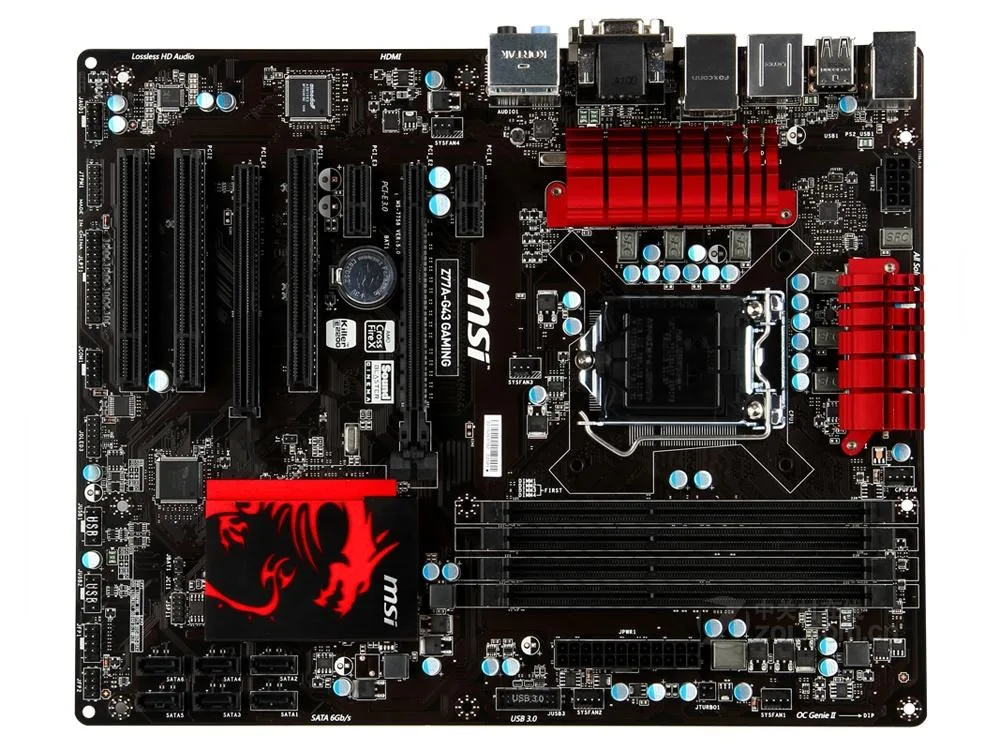


MSI
LGA 1155 ATX board with Intel Z77 chipset, dual-channel DDR3 up to 2800 MHz, 32 GB maximum, one PCIe 3.0 x16 slot, four SATA II and two SATA III ports.
This MSI Z77A-G43 GAMING motherboard uses the Intel Z77 chipset and an LGA 1155 socket. It accepts third-generation Intel Core i7, i5, i3, Pentium and Celeron processors. The board follows the ATX form factor and supports up to 32GB of system memory.
Four DDR3 slots run at speeds from 1066MHz to 2800MHz when overclocked. A single PCIe 3.0 x16 slot handles modern graphics cards. Additional slots include a second PCIe 3.0 x16 connector, a PCIe 2.0 x16 slot running at x4, one PCIe 2.0 x1 slot and three legacy PCI slots.
Six SATA ports provide four SATA II and two SATA III connections for storage arrays. The Realtek ALC892 codec delivers 8.1-channel audio with intelligent jack detection. A Killer E2205 gigabit LAN controller manages wired networking at 10/100/1000 speeds. Two USB 3.0 ports sit on the rear I/O panel and one internal USB 3.0 header is available for front-panel use.
| Brand | MSI |
|---|---|
| Series | MSI Z77A-G43 GAMING |
| Model | MSI Z77A-G43 GAMING |
| CPU Socket Type | LGA 1155 |
| CPU Type | Support LGA 1155 3rd generation Intel Core ™ i7/Core ™ i5/Core ™ i3/Pentium/Celeron processor |
| Chipset | Intel Z77 |
| Memory Standard | Supports dual-channel DDR3 2800 (overclocking)/2667 (overclocking)/2600/2400/2200/2133/1866/1600/1333/1066MHz memory |
| Maximum Memory Supported | 32GB |
| PCI Slots | 1 x PCIe 3.0 x16 slot PCI_E2 up to PCIe 3.0 x16 speeds 1 x PCIe 2.0 x16 slot PCI_E4 supports up to PCIe 2.0 x4 speeds 1 x PCIe 2.0 x1 slot 3 x PCI slots |
| SATA RAID | 4XSATA II interface; 2xSATA III interface |
| Audio Chipset | Realtek ALC892 Audio Chip - 8.1 channel sound effects that support intelligent sound interface detection Compatible with Azalia 1.0 specifications |
| LAN Chipset | 1 PCI Express network port supports 10/100/1000 Fast Ethernet provided by Killer E2205 * Gigabit network interface card |
| Onboard USB | Intel Z77 chip supports two USB 3.0 I/O ports Intel Z77 chip supports a USB 3.0 internal port |
The board follows the E-ATX form factor, so it requires a case that accepts E-ATX motherboards; CPU cooler clearance is determined by the case, not the board.
Install the processor into the LGA 1155 socket, then fill the two primary DDR3 slots for dual-channel operation before adding the remaining two sticks.
Replace the supplied CMOS battery when the system loses date, time or BIOS settings after being powered off, typically after several years of use.
Also in this aisle
Same shelf, same checkout — eight coins and a 30-minute rate lock.
What you pay in, and what you read prices in.
Sent from your wallet at checkout
Display only — the catalogue is priced in USD
No currency matches that.
Pick the language the site speaks to you in.
New here?
Already have one?
There is no automatic reset: this shop sends no mail, so there is no one-time link to ask for. Leave the address on the account and it gets picked up by hand.
Request noted
Nothing is on its way to your inbox — this shop sends no mail at all. Someone picks these up by hand.
Remembered it?


