
Synology Inc.
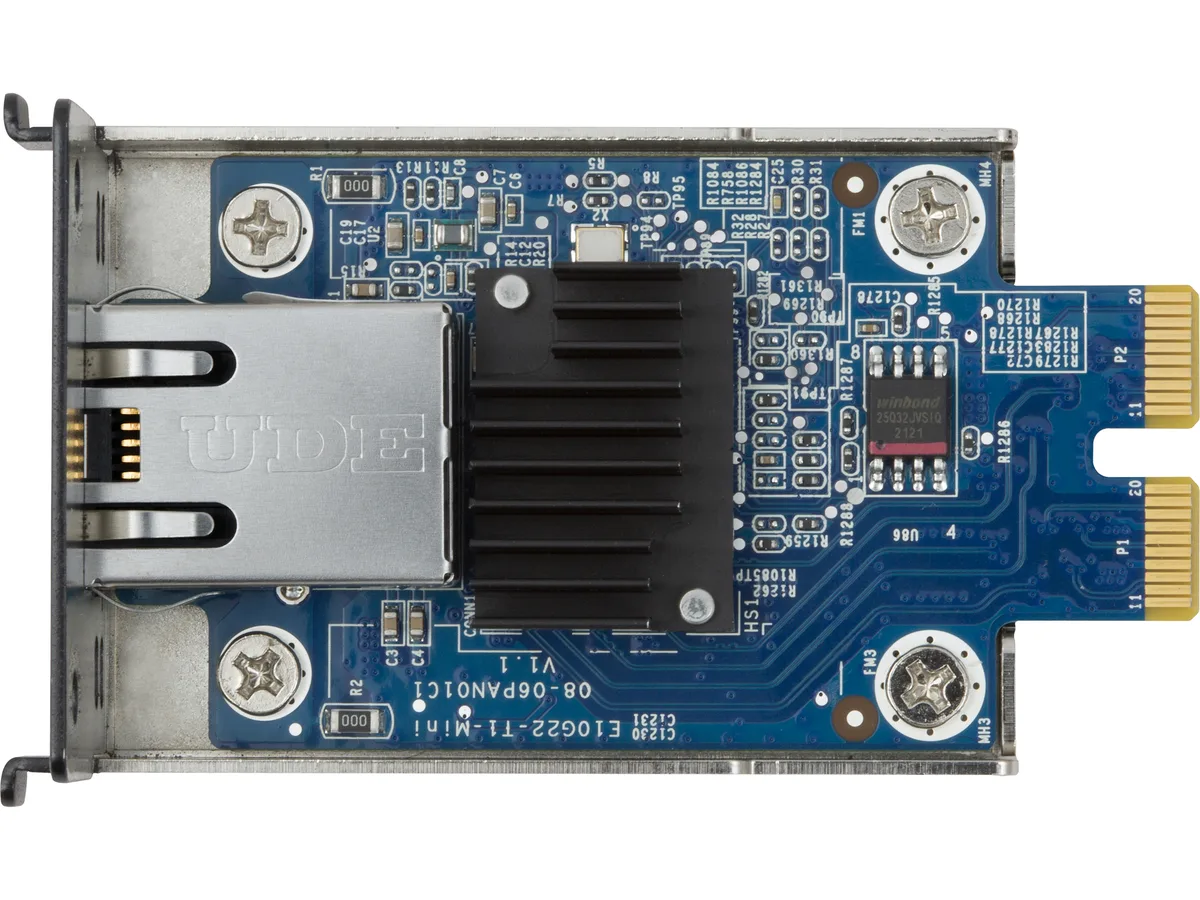
Synology E10G22-T1-Mini 10GbE RJ-45 Network Upgrade Module
Adds 10GbE RJ-45 connectivity to compatible compact Synology servers, auto-negotiating speeds from 100 Mbps to 10 Gbps for high-bandwidth workloads
- StandardsIEEE 802.3an 10GBASE-T 10 Gbps Ethernet IEEE 802.3bz NBASE-T
- TemperatureOperating Temperature: 0°C to 40°C (32°F to 104°F) Storage T
- Humidity5% to 95% RH
- FeaturesHigh Bandwidth Expands system capabilities with 10GbE connec
- Dimensions1.04" x 1.79" x 2.98"
Option E10G22-T1-Mini
- E10G22-T1-Mini
- E10M20-T1
- Adds 10 Gbps Ethernet for demanding workloads
- Auto-negotiates 10, 5, 2.5, 1 Gbps and 100 Mbps links
- Offloads checksum, segmentation and receive scaling to the adapter
- Operates from 0°C to 40°C with 5% to 95% humidity tolerance
- Fits compact Synology servers through the dedicated upgrade slot
10GbE Network Upgrade Module
The Synology E10G22-T1-Mini adds a 10GbE RJ-45 port to compatible compact Synology servers through a dedicated network upgrade slot. It supports IEEE 802.3an 10GBASE-T, NBASE-T 2.5/5GbE, and backwards-compatible 1GbE and 100MbE standards. Auto-negotiation selects the highest available speed automatically. The module operates from 0°C to 40°C.
Suited for multi-gigabit LAN environments
Editors and small teams moving large media files or running concurrent backups benefit from the 10Gbps link and 9KB jumbo frames. Offload features such as TCP/UDP/IP checksum, TSO, LSO, RSS, GRO and GSO reduce host CPU load during sustained transfers. Buyers whose Synology unit lacks the dedicated Network Upgrade Slot cannot use this module and must seek alternative connectivity.
Requires a dedicated Network Upgrade Slot
Compatibility is limited to Synology models equipped with the specific internal slot for this form factor. The module measures 1.04" x 1.79" x 2.98" and draws power directly from the slot. No other interface or adapter is supported. Verify the slot exists on the target server before purchase.
Highlights
- Adds 10 Gbps Ethernet for demanding workloads
- Auto-negotiates 10, 5, 2.5, 1 Gbps and 100 Mbps links
- Offloads checksum, segmentation and receive scaling to the adapter
- Operates from 0°C to 40°C with 5% to 95% humidity tolerance
- Fits compact Synology servers through the dedicated upgrade slot
Specifications
| Brand | Synology |
|---|---|
| Model | E10G22-T1-Mini |
| Standards | IEEE 802.3an 10GBASE-T 10 Gbps Ethernet IEEE 802.3bz NBASE-T 2.5/5 Gbps Ethernet IEEE 802.3ab 1000BASE-T 1 Gbps Ethernet IEEE 802.3u 100BASE-TX Fast Ethernet IEEE 802.3x Flow Control |
| Temperature | Operating Temperature: 0°C to 40°C (32°F to 104°F) Storage Temperature: -20°C to 60°C (-5°F to 140°F) |
| Humidity | 5% to 95% RH |
| Features | High Bandwidth Expands system capabilities with 10GbE connectivity to support higher resolution video editing, concurrent backup ingestion, and more Flexible Integration Supports 10/5/2.5/1GbE connections to work with nearly any RJ-45 network environment For Synology by Synology Designed for maximum performance and reliability in Synology systems Data transfer rates: 10/5/2.5/1 Gbps/100 Mbps Network operation mode: Full Duplex Applied Models: RS422+ |
| Dimensions | 1.04" x 1.79" x 2.98" |
| Shipping weight | 0.11 kg |
| Package size | 140 × 97 × 42 mm |
Other versions of this model
1 more in the same range
Same family, different memory, cooler or clock — compare before you commit.

Questions about this item
How do I install the E10G22-T1-Mini in the dedicated network upgrade slot?
Power off the compatible Synology server, open the chassis cover, align the module with the dedicated network upgrade slot, press firmly until seated, replace the cover, and power on; the step often missed is fully powering down before insertion to avoid detection issues
What maintenance or replacement will the E10G22-T1-Mini need over time?
No scheduled maintenance is required; keep the operating environment within 0°C to 40°C and 5% to 95% RH, ensure airflow around the 1.04" x 1.79" x 2.98" module remains unobstructed, and replace only if a port fails or network needs change
What limit appears first during sustained 10 Gbps transfers on the E10G22-T1-Mini?
The primary limit is the host system's PCIe lane allocation and CPU offload capacity — features such as TCP/UDP/IP checksum offloading, TSO, LSO, RSS, GRO and GSO reduce overhead, but sustained line-rate throughput depends on the server's internal bus and processing headroom
Also in this aisle
People compared these
Same shelf, same checkout — eight coins and a 30-minute rate lock.

Seagate
Seagate Cheetah NS ST3400755SSProduct 400 GB 3.5" SAS internal hard drive
- SLC
$23.99
0.0003061BTC
In stock

