

Seagate
Seagate ST500DM002 500GB 16MB Cache SATA 6.0Gb/s 3.5" Internal Hard Drive
- Bare Drive
- SATA 6.0Gb/s
66,99 USD
0.00083484BTC
DostępnyAkceptujemy kryptowaluty — posiadane środki można więc wykorzystać na zakup prawdziwego sprzętu.Płatność kryptowalutą — realny sprzęt w zamian. Bezpłatna, ubezpieczona dostawa na całym świecie powyżej 399 $. Neutralne kartony, bez oznaczeń, wysyłane z Niemiec.Bezpłatna, ubezpieczona dostawa powyżej 399 $. Kurs zostaje zablokowany na 30 minut od otwarcia kasy.Kurs zablokowany na 30 minut. Każdy produkt jest fabrycznie zapieczętowany, jego numer seryjny jest sprawdzany, a całość objęta jest 24-miesięczną gwarancją.Zapieczętowane fabrycznie, 24 miesiące gwarancji.
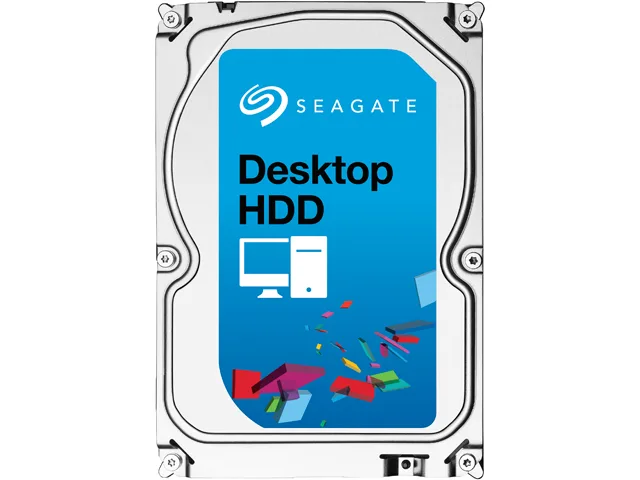


Seagate
3 TB desktop hard drive with 7200 RPM, 64 MB cache and SATA 6.0 Gb/s interface
This Seagate Desktop HDD provides 3TB of storage on a 3.5" SATA 6.0Gb/s interface with 64MB cache. It spins at 7200 RPM and targets desktop PCs, all-in-one systems, home servers and entry-level direct-attached storage. The bare drive arrives without cables or mounting hardware.
Moving to this model adds capacity with 1.33TB-per-disk technology and a SATA 6.0Gb/s interface that optimises burst performance. The jump is worth it when current storage is full or when faster sequential access matters for large media libraries and backups.
Mount the drive in any 3.5" bay using four screws, connect the SATA data and power cables, then initialise the disk in the operating system. Common issues include forgetting to enable AHCI in BIOS, using an old SATA cable that limits speed, or skipping the partition alignment step that Seagate SmartAlign handles for Advanced Format 4K sectors.
| Brand | Seagate |
|---|---|
| Series | Desktop HDD |
| Model | ST3000DM001 |
| Packaging | Bare Drive |
| Interface | SATA 6.0Gb/s |
| Capacity | 3TB |
| Cache | 64MB |
| Average Seek Time | <8.5ms |
| Average Write Time | <9.5ms |
| Features | The Power of One: Seagate brings over 30 years of trusted performance and reliability to the Seagate Desktop HDDs Increase your capacity and drive down costs with up to 1.33TB-per-disk hard drive technology SATA 6Gb/s interface optimizes burst performance Seagate AcuTrac servo technology delivers dependable performance Free DiscWizard software enables high capacities on legacy PC BIOS systems Seagate Secure models provide hardware-based data security and deliver an Instant Secure Erase feature for safe, fast and easy drive retirement* Seagate Secure models meet the NIST 800-88 media |
| Usage | Ideal for Servers |
| Form Factor | 3.5" |
| Height (maximum) | 26.11mm |
| Width (maximum) | 101.60mm |
| Length (maximum) | 146.99mm |
| Waga przesyłki | 0.62 kg |
| Wymiary opakowania | 152 × 102 × 25 mm |
Inne wersje tego modelu
Ta sama rodzina, inna pamięć, inne chłodzenie lub taktowanie — proszę porównać przed decyzją.
The drive measures 146.99 mm long, 101.60 mm wide and 26.11 mm high, matching the standard 3.5" form factor.
Attach a SATA data cable to the motherboard port and a SATA power connector from the PSU; the step often missed is enabling AHCI mode in BIOS before installing the OS.
Plan replacement after three to five years of continuous use or if SMART attributes such as reallocated sectors begin to rise.
Także w tym dziale
Ten sam dział, ta sama kasa — osiem kryptowalut i 30-minutowa blokada kursu.
Waluta płatności i waluta wyświetlania cen.
Wysyłane z portfela przy kasie
Tylko podgląd — katalog wyceniony jest w dolarach
Brak pasującej waluty.
Wybierz język, w którym wyświetla się strona.
Pierwsza wizyta?
Konto już założone?
Nie ma automatycznego resetowania hasła: ten sklep nie wysyła żadnych e-maili, więc nie ma jednorazowego linku, o który można by poprosić. Adres pozostawiony przy koncie zostanie obsłużony ręcznie.
Zgłoszenie zapisane
Do skrzynki odbiorczej nic nie trafi — ten sklep nie wysyła żadnych e-maili. Zgłoszenia są obsługiwane ręcznie.
Hasło się przypomniało?





