ASUS
ASUS RNUC16GDKU56000U barebone mini PC Core Ultra 5 325 DDR5
- Black
- AI Ready
US$424.99US$438.99−3%
0.00540844BTC
現貨


ASUS
Barebone mini PC with 16-core Intel Core Ultra X7 358H, 32 GB LPDDR5x, dual M.2 slots, Wi-Fi 7, Bluetooth 6.0, dual 2.5 Gbps LAN and Thunderbolt 4
Type Intel Core Ultra X7 358H(Panther lake CPU )
The ASUS NUC 16 Pro barebone packs an Intel Core Ultra X7 358H processor with 16 cores and 32GB of onboard LPDDR5x memory. It targets businesses that need a small footprint system for AI inference, digital signage or industrial automation. The 144 x 117 x 42 mm chassis includes dual 2.5Gbps LAN, Wi-Fi 7 and Bluetooth 6.0 for high-speed wired and wireless connectivity. Tool-less access simplifies storage upgrades in deployed environments.
This unit suits IT teams deploying compact workstations, kiosks or edge servers that benefit from the integrated Arc B390 graphics and NPU acceleration. Dual Thunderbolt 4 and two HDMI 2.1 ports drive multiple 4K displays at 60 Hz. Buyers who require user-replaceable system memory or discrete graphics cards should look at larger form-factor platforms instead.
Two M.2 2280 slots accept NVMe SSDs from 128 GB up to 8 TB each, one wired for PCIe Gen5 x4 and the other for Gen4 x4. The 32 GB LPDDR5x is soldered, so total system memory cannot be expanded beyond the factory configuration. The 180 TOPS platform rating indicates headroom for concurrent AI workloads, while the fixed memory capacity sets a hard ceiling for memory-intensive virtualisation or large dataset caching.
| Brand | ASUS |
|---|---|
| Series | NUC 16 Pro |
| Model | RNUC16GDKX76C00U |
| Part Number | 90AR00W2-M00170 |
| Color | Black |
| CPU Type | Intel Core Ultra X7 358H |
| CPU Cores | 16-Core (4P+8E+4LP) |
| Memory installed | 32GB |
| Memory Type Supported | LPDDR5X 8533 |
| M.2 Slot | 1 x M.2 2280 PCIe Gen5x4 NVMe SSD Slot (supports 128GB ~ 8TB) 1 x M.2 2280 PCIe Gen4x4 NVMe SSD Slot (supports 128GB ~ 8TB) |
| Integrated Graphics | Intel Arc B390 GPU |
| LAN | Intel i226V |
| Max LAN Speed | Dual 2.5Gbps |
| Wireless LAN | 802.11be |
| WiFi Generation | Wi-Fi 7 |
| Bluetooth | Bluetooth 6.0 |
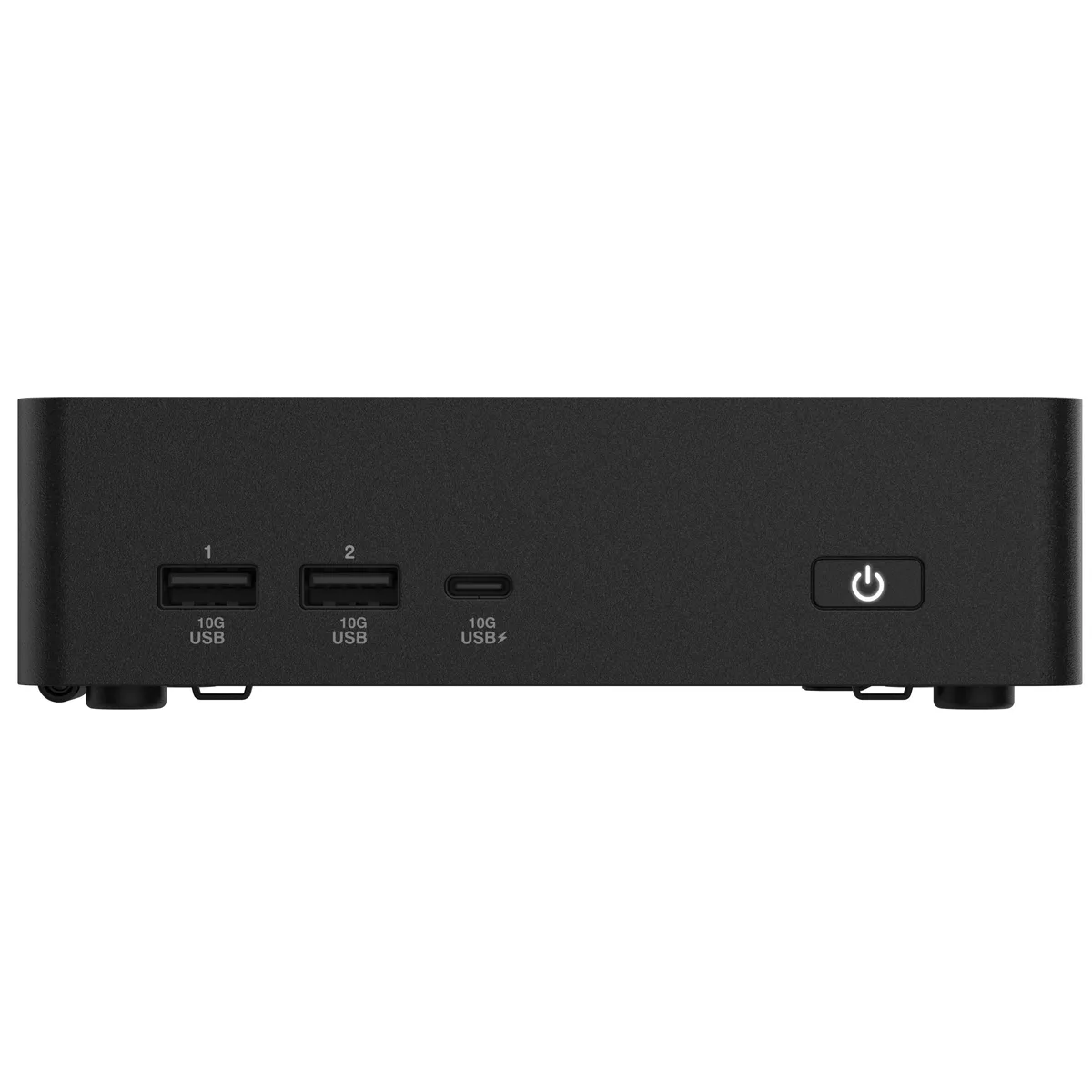
| Front USB | 1 x USB 3.2 Gen2x1 Type-C (10Gbps) 2 x USB 3.2 Gen2 Type-A (10Gbps) |
| HDMI | 2 x HDMI 2.1 (up to 4K@60Hz) |
| Thunderbolt | 2 x Thunderbolt 4 (DP2.1 & USB4) |
| Rear USB | 2 x USB 3.2 Gen2 Type-A (10Gbps) |
| RJ45 | 2 x Intel 2.5G LAN (RJ45) |
| Internal Connectors | 1 x Cable Locking Arm 1 x DC-in |
| Dimensions | 5.67" x 4.61" x 1.65" |
| Weight | 1.51 lbs. |
| Packaging | VESA Mount & Screws / Power Adapter / US Power Cord |
| 出貨重量 | 1.54 kg |
| 包裝尺寸 | 213 × 171 × 108 mm |
其他版本
同系列產品,記憶體、散熱器或時脈不同 — 下單前請先比較。
You need to add one M.2 2280 PCIe Gen5x4 NVMe SSD and one M.2 2280 PCIe Gen4x4 NVMe SSD; each slot accepts 128 GB to 8 TB.
Yes, both Intel i226V ports run at 2.5 Gbps and are backward compatible with slower Ethernet gear.
Open Device Manager or the Intel Graphics Command Center; the B390 GPU should appear with driver version details.
同類商品
同一分類,同一套結帳流程 — 支援八種加密貨幣,匯率鎖定 30 分鐘。
您支付所用的幣種,以及查看價格所用的貨幣。
結帳時由您的錢包發送
僅供顯示 — 商品目錄以美元計價
查無符合的貨幣。
請選擇網站使用的語言。
查無符合的語言。
初次造訪?
已經有帳戶了嗎?
本店沒有自動重設密碼的機制:由於不寄送電子郵件,也就沒有一次性連結可供申請。只要將地址留在帳戶中,之後將由專人處理。
請求已收到
不會有任何郵件寄到您的信箱 — 本商店完全不寄送電子郵件。會有人親自處理這些申請。
想起來了嗎?