

SanDisk
SanDisk Cruzer Blade 8 GB USB 2.0 USB flash drive Black SDCZ50-008G-B35
US$391.99
0.00501144BTC
現貨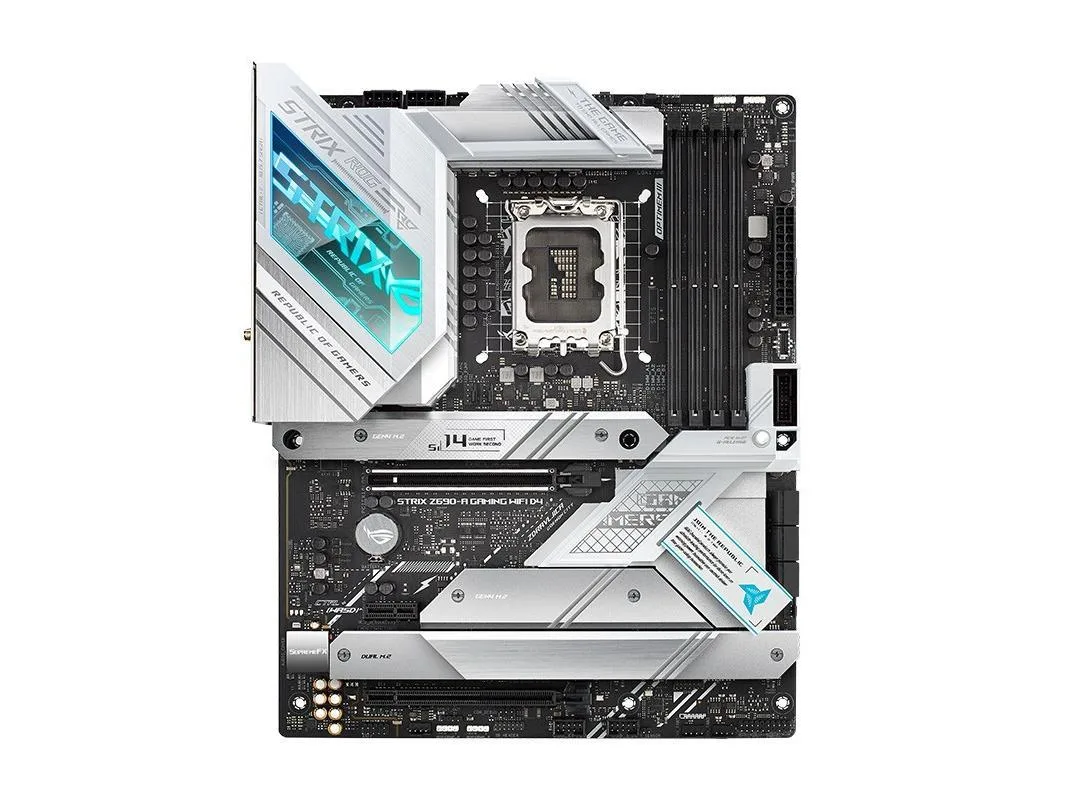


ASUS
An ATX Intel Z690 motherboard with LGA 1700 socket supporting 12th, 13th and 14th generation CPUs, dual-channel DDR4 up to 5333 MHz and 192 GB capacity, PCIe 5.0 x16, six SATA ports.
The ASUS ROG STRIX Z690-A GAMING WIFI is an ATX motherboard built around the Intel Z690 chipset and the LGA 1700 socket. It accepts Intel Core processors from the 12th, 13th and 14th generations as well as Pentium Gold and Celeron models. The board supports dual-channel DDR4 memory up to 192 GB with overclocked speeds reaching 5333 MHz.
The board measures 30.5 by 24.4 cm and uses standard ATX mounting points for case installation. Rear I/O provides 10 USB ports including one USB 3.2 Gen 2x2 Type-C, three USB 3.2 Gen 2 ports and four USB 3.2 Gen 1 ports. Internal storage options include four M.2 interfaces and six SATA III connectors, while audio is handled by the ROG SupremeFX ALC4080 codec delivering 7.1 surround sound.
The primary PCIe 5.0 x16 slot is wired directly to the CPU and its bandwidth depends on the installed processor generation. A second full-length slot from the chipset operates at PCIe 3.0 x4 mode, and a single PCIe 3.0 x1 slot is also available. Wireless networking uses Intel Wi-Fi 6E, and the board ships without original packaging or most accessories.
| Brand | ASUS |
|---|---|
| Series | ASUS ROG STRIX Z690-A GAMING WIFI |
| Model | ASUS ROG STRIX Z690-A GAMING WIFI |
| CPU Socket Type | LGA 1700 |
| CPU Type | Intel Socket LGA1700 is suitable for Intel Core, 14th and 13th generation processors, Intel Core, 12th generation, Pentium Gold and Celeron processors Supports Intel Turbo Boost Technology 2.0 and Intel Turbo Boost Max Technology 3.0 *** |
| Chipset | Intel Z690 |
| Memory Standard | Supports dual-channel DDR4 5333 (OC) MHz memory |
| Maximum Memory Supported | 192GB |
| PCI Slots | Intel Core processors (14th, 13th, and 12th generations) 1 x PCIe 5.0/4 0/3.0 x16 slots * Intel Z690 Chipset ** 1 x PCIe 3.0 x16 slot (supports x4 mode) * 1 x PCIe 3.0 x1 slot |
| SATA RAID | 4XM.2 interface, 6xSATA III interface |
| Audio Chipset | ROG SupremeFX 7.1 surround high fidelity audio codec ALC4080 |
| LAN Chipset | Intel Wi-Fi 6E |
| Onboard USB | Rear panel USB: 10 ports in total 1 x USB 3.2 Gen 2x2 interface (1 x USB Type-C) 3 x USB 3.2 Gen 2 ports (2 x Type-A + 1 x USB Type-C) 4 x USB 3.2 Gen 1 ports (4 x Type-A) 2 x USB 2.0 ports (2 x Type-A) Front panel USB: 7 ports in total 1 x USB 3.2 Gen 2x2 interface (supports USB Type-C) 1 x USB 3.2 Gen 1 pin support, additional 2 USB 3.2 Gen 1 ports 2 x USB 2.0 connectors support an additional 4 USB 2.0 ports |
The primary slot is PCIe 5.0 x16, so a graphics card will be limited to PCIe 5.0 bandwidth when installed there.
The board measures 30.5 by 24.4 centimetres and follows the ATX mounting pattern.
The separate metal I/O panel must be pressed into the case cut-out from the inside before the motherboard is lowered into place; many builders forget to seat it first.
同類商品
同一分類,同一套結帳流程 — 支援八種加密貨幣,匯率鎖定 30 分鐘。
您支付所用的幣種,以及查看價格所用的貨幣。
結帳時由您的錢包發送
僅供顯示 — 商品目錄以美元計價
查無符合的貨幣。
請選擇網站使用的語言。
查無符合的語言。
初次造訪?
已經有帳戶了嗎?
本店沒有自動重設密碼的機制:由於不寄送電子郵件,也就沒有一次性連結可供申請。只要將地址留在帳戶中,之後將由專人處理。
請求已收到
不會有任何郵件寄到您的信箱 — 本商店完全不寄送電子郵件。會有人親自處理這些申請。
想起來了嗎?



