

EN-Labs
EN-Labs 11-001-366 PCIe x4 USB 3.2 10Gbps 5-port card
- no
- 12CM Case fan,screw…
US$31.99
0.00041041BTC
現貨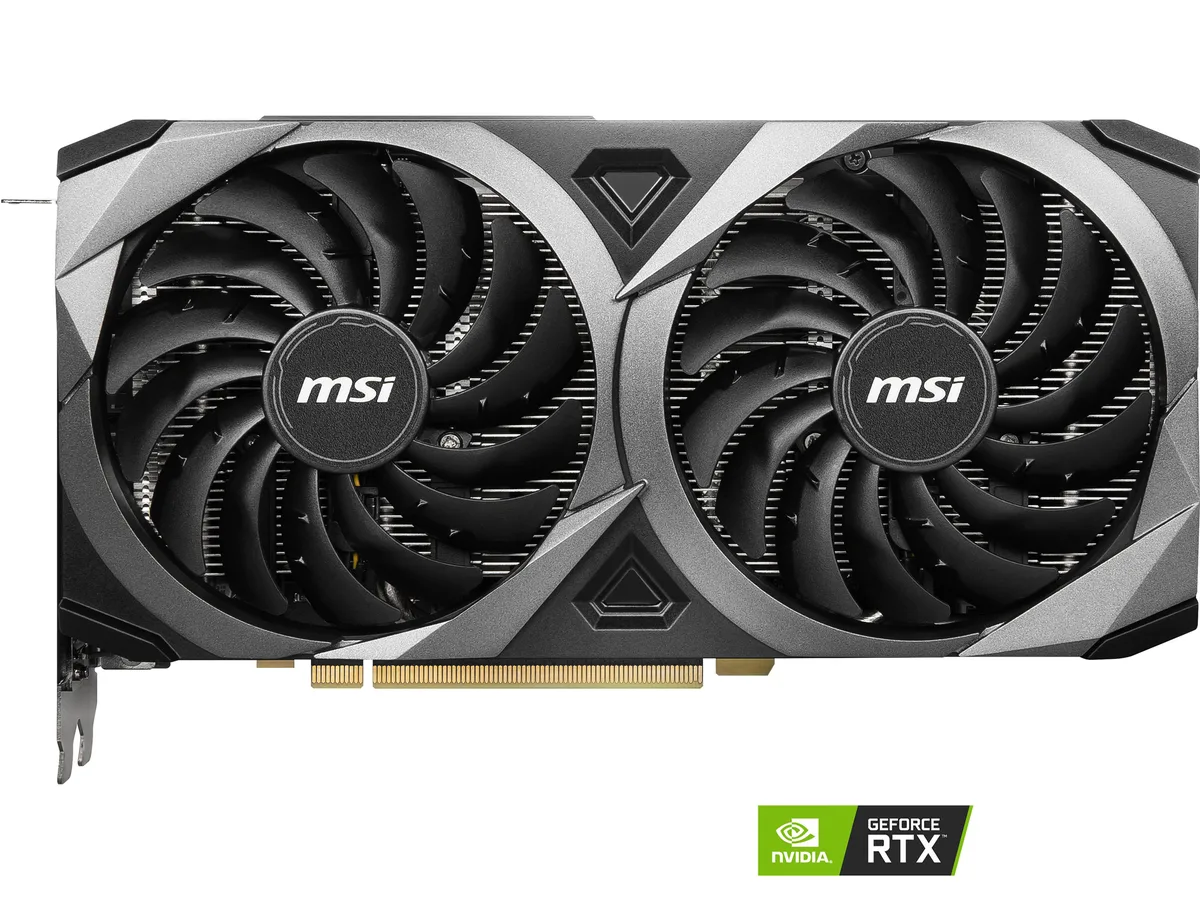


MSI
Refurbished GeForce RTX 3060 Ti with 8 GB GDDR6 on a 256-bit bus, 4864 CUDA cores, 1695 MHz boost clock, PCIe 4.0, HDMI 2.1 plus three DisplayPort 1.4 outputs, and dual-fan cooling
The MSI Ventus GeForce RTX 3060 Ti arrives as a refurbished unit with 8 GB of GDDR6 memory on a 256-bit interface. It connects through a PCI Express 4.0 slot and delivers a boost clock of 1695 MHz across 4864 CUDA cores. The double-fan cooler fits within a 232 mm length.
This card targets players who want solid 1440p performance and virtual reality readiness. The four-display output array (one HDMI 2.1, three DisplayPort 1.4) drives up to 7680 x 4320 resolution. Builders needing higher 4K frame rates or different power phasing should consider other models.
The 256-bit memory bus paired with 14 Gbps GDDR6 sets the bandwidth ceiling for texture-heavy workloads. If your engine or renderer demands wider bus width or larger frame buffers, this specification is the limiting factor. Otherwise the 8 GB capacity and PCI Express 4.0 link cover mainstream creative and gaming needs.
| Brand | MSI |
|---|---|
| Series | Ventus |
| Model | RTX 3060 Ti VENTUS 2X OC |
| Interface | PCI Express 4.0 |
| Chipset Manufacturer | NVIDIA |
| GPU Series | NVIDIA GeForce RTX 30 Series |
| GPU | GeForce RTX 3060 Ti |
| Boost Clock | 1695 MHz |
| CUDA Cores | 4864 |
| Effective Memory Clock | 14 Gbps |
| Memory Size | 8GB |
| Memory Interface | 256-Bit |
| Memory Type | GDDR6 |
| DirectX | DirectX 12 |
| OpenGL | OpenGL 4.6 |
| Multi-Monitor Support | 4 |
| HDMI | 1 x HDMI 2.1 |
| DisplayPort | 3 x DisplayPort 1.4 |
| Max Resolution | 7680 x 4320 |
| Virtual Reality Ready | Yes |
| Cooler | Double Fans |
| Power Connector | 2 x 8-Pin |
| HDCP Ready | Yes |
| Max GPU Length | 232 mm |
| Card Dimensions (L x H) | 9.13" x 4.88" |
| 出貨重量 | 1.27 kg |
| 包裝尺寸 | 344 × 265 × 80 mm |
The card measures 232 mm long and 9.13 inches by 4.88 inches overall, so verify your case has at least that much GPU clearance and two free expansion slots before ordering.
Install the card into a PCI Express 4.0 x16 slot, connect both 8-pin power cables from the PSU, and remember to seat the retention bracket screw — skipping that screw is the most common mistake.
Blow dust from the two fans and heatsink every three to six months; thermal paste on the GPU die typically lasts several years, so plan to re-paste only if temperatures rise noticeably after heavy use.
同類商品
同一分類,同一套結帳流程 — 支援八種加密貨幣,匯率鎖定 30 分鐘。
您支付所用的幣種,以及查看價格所用的貨幣。
結帳時由您的錢包發送
僅供顯示 — 商品目錄以美元計價
查無符合的貨幣。
請選擇網站使用的語言。
No language matches that.
初次造訪?
已經有帳戶了嗎?
本店沒有自動重設密碼的機制:由於不寄送電子郵件,也就沒有一次性連結可供申請。只要將地址留在帳戶中,之後將由專人處理。
請求已收到
不會有任何郵件寄到您的信箱 — 本商店完全不寄送電子郵件。會有人親自處理這些申請。
想起來了嗎?



