


myVolts
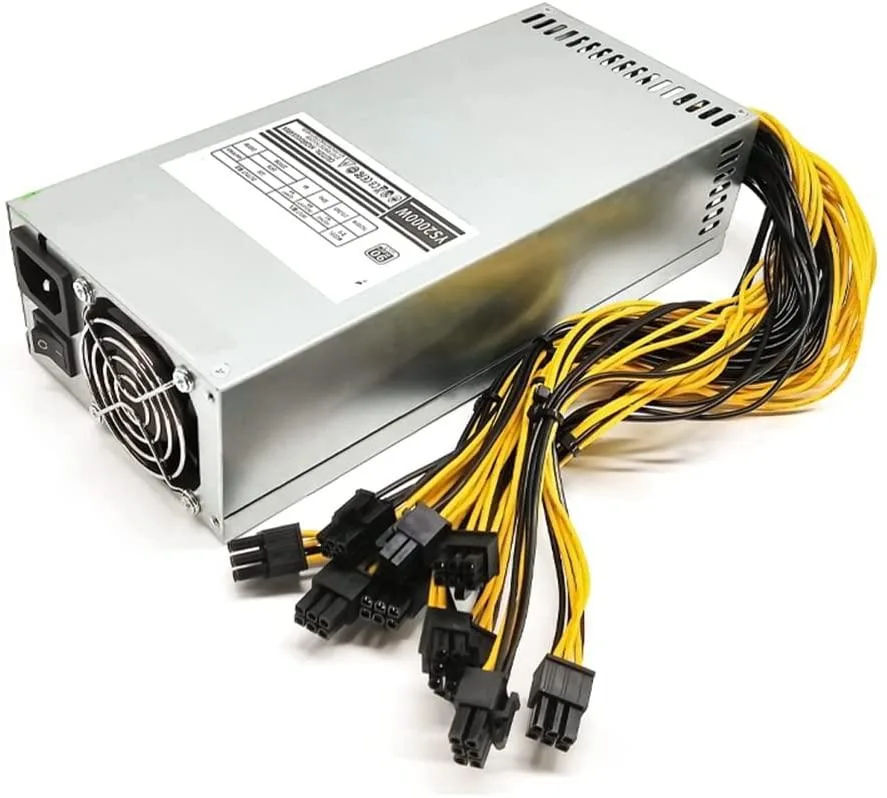
myVolts 1800W 2U AT Mining Power Supply 10x PCI-E 6-Pin 400mm
1800 W AT power supply for mining rigs with ten 400 mm PCI-E 6-pin connectors
- TypeAT
- 1800 W output powers demanding mining rigs
- Ten PCI-E 6-pin connectors each 400 mm long feed multiple GPUs
- 175–240 V input range suits global mains supplies
- Compact 2U form factor fits 240 × 110 × 58 mm server chassis
- Built-in input and output switches simplify power control
1800W Mining Power Supply
This 1800W AT power supply is built for mining rigs that run multiple GPUs or ASIC units such as the Antminer S9, S7, L3+ or D3. It accepts an input range of 175V to 240V and includes both input and output switches for direct control.
Metal Chassis with Ten PCI-E Connectors
The silver metal housing measures 240mm by 110mm by 58mm and fits a 2U rack footprint. Ten PCI-E 6-pin cables each 400mm long connect up to six graphics cards or miner boards without extra adapters.
Single 8cm Fan Cooling
One 8cm fan moves air through the compact chassis to manage thermals at full 1800W load. The metal body aids heat dissipation while the fan speed responds to power draw, keeping noise proportional to the mining workload.
商品特色
- 1800 W output powers demanding mining rigs
- Ten PCI-E 6-pin connectors each 400 mm long feed multiple GPUs
- 175–240 V input range suits global mains supplies
- Compact 2U form factor fits 240 × 110 × 58 mm server chassis
- Built-in input and output switches simplify power control
商品規格
| Type | AT |
|---|
商品問答
What input voltage range does the 1800W AT power supply accept?
The unit operates on 175V to 240V AC input, so it requires a mains supply within that window and will not start on standard 110V circuits.
Will the 240mm long, 58mm high chassis fit in a standard 2U rack slot?
At 240mm wide, 110mm deep and 58mm tall it matches a 2U form factor, but verify your rack’s usable depth and cable bend radius before mounting.
How do I safely connect the ten 6-pin PCIe cables to my GPUs?
Switch the PSU off at both input and output toggles, seat each 400mm 6-pin connector fully until the latch clicks, then power on — skipping the output switch is the common mistake.
同類商品
顧客也比較過
同一分類,同一套結帳流程 — 支援八種加密貨幣,匯率鎖定 30 分鐘。


Mushkin Enhanced
Mushkin Enhanced 4GB DDR2-800 CL6 SoDIMM Apple 971741A memory upgrade
US$104.99
0.00133106BTC
現貨

SK hynix
SK hynix HYMD232M646C6-J 256MB DDR 333MHz PC2700 CL2.5 SODIMM laptop RAM
- 4GB (2 x 2GB)
US$7.99
0.0001013BTC
現貨