

Raywego
Raywego 24" Curved Gaming Monitor 200Hz FHD 1ms VA 3000R Black
- 24"
- 200Hz
69,99 US$
0.00087402BTC
En stockAceptamos criptomonedas — así, las criptos que usted tiene pueden comprar hardware real.Pague en cripto y gástela en hardware real. Envío asegurado gratis a nivel mundial a partir de $399. Cajas neutras, sin marca, enviadas desde Alemania.Envío asegurado gratis a partir de $399. Su cotización queda bloqueada 30 minutos en cuanto se abre el pago.Cotización bloqueada 30 minutos. Todos los artículos vienen sellados, con el número de serie verificado y cubiertos por una garantía de 24 meses.Sellado, con 24 meses de garantía.


Raywego
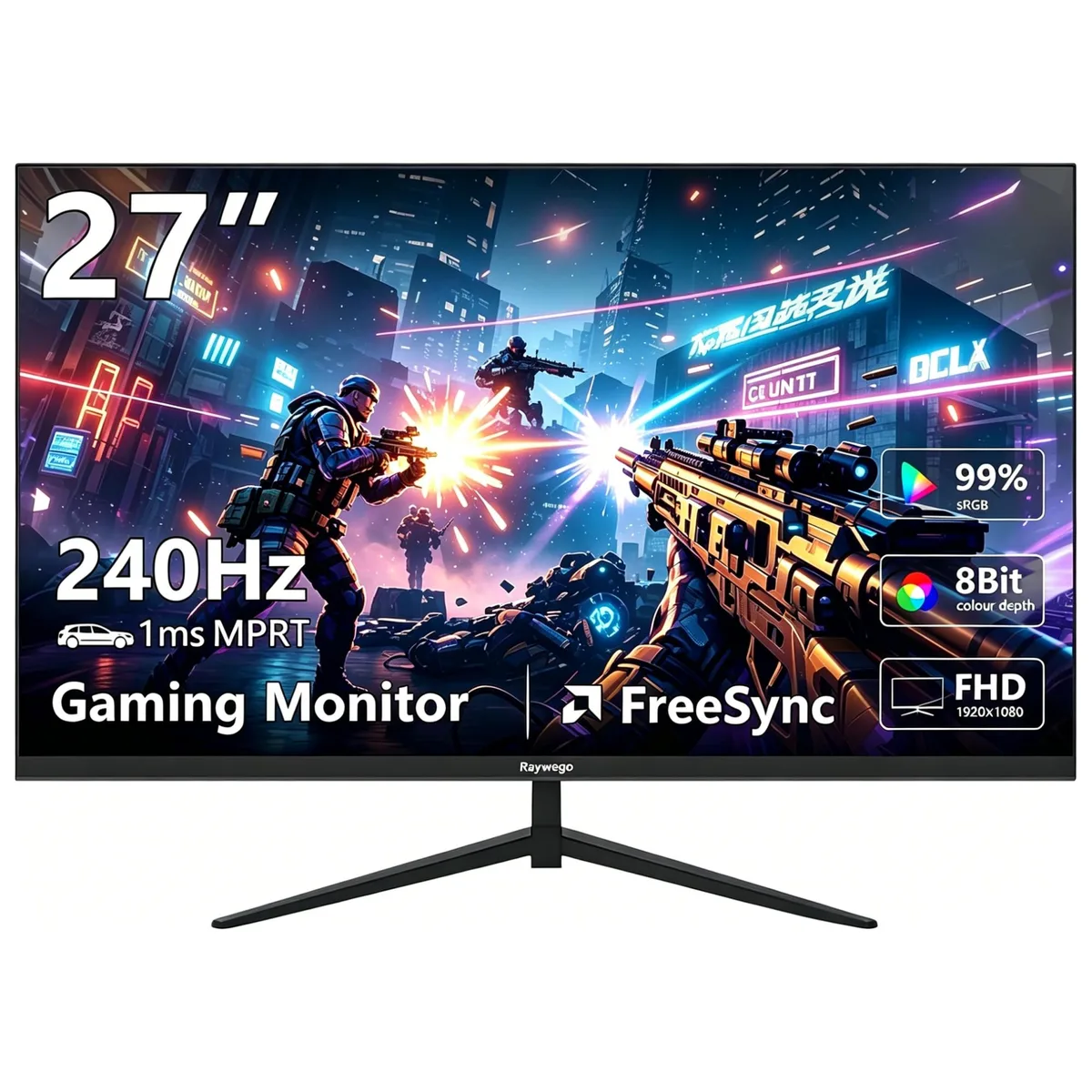
A 27-inch flat VA gaming monitor with 240Hz refresh rate, 1ms response time, 99% sRGB coverage, HDR10 support, 400 cd/m² brightness, FreeSync and G-Sync compatibility, plus VESA 100mm mounting
Raywego 27 inch 240Hz
The Raywego 27 inch flat VA panel delivers a 1920 x 1080 resolution at a 240Hz refresh rate with 1ms MPRT response time. It covers 99 percent sRGB colour gamut and supports HDR10 for vivid visuals. Competitive gamers seeking high frame rates in fast-paced titles will benefit from the smooth motion clarity and adaptive sync compatibility.
The monitor includes two HDMI 2.0 ports and two DisplayPort 1.4 inputs plus an AC power connection for flexible device hookup. A 100mm x 100mm VESA pattern allows standard arm or wall mounting on a flat panel. Users must select DisplayPort 1.4 to reach the full 240Hz refresh rate as HDMI 2.0 may limit the maximum frame rate at this resolution.
DisplayPort 1.4 provides the necessary bandwidth for 240Hz at 1920 x 1080 while HDMI 2.0 may not sustain the top refresh rate. The VA panel offers 178 degree viewing angles with a typical 1000:1 contrast ratio and 400 cd/m2 brightness. Buyers needing higher pixel density for detailed productivity work or wider colour volumes beyond sRGB should consider alternative specifications.
| Screen Size | 27" |
|---|---|
| Refresh Rate | 240Hz |
| Resolution | 1920 x 1080 |
| Response Time | 1 ms |
| Display Colors | 16.7 Million |
| Panel | VA |
| Aspect Ratio | 16:9 |
| Curved Surface Screen | Flat Panel |
| Widescreen | Yes |
| Brightness | 400 cd/m2 |
| Contrast Ratio | 1000:1 |
| Glare Screen | Anti-glare |
| Maximum Resolution | 1920 x 1080 |
| Viewing Angle | 89° (H) / 89° (V) |
| Horizontal Refresh Rate | 240 Hz |
| Display Type | FHD |
| Adaptive Sync Technology | FreeSync & G-Sync Compatible |
| Color Gamut | sRGB 99% |
| HDR Standard | HDR10 |
| Brand | Raywego |
| Model | Z27 |
| Series | Z27B15 |
| Cabinet Color | Black |
| Bezel Design | 3 Sided Frameless |
| Cosmetic Condition | Grade A |
| HDMI | 2 x HDMI 2.0 |
| Connectors | HDMI, DisplayPort |
| DisplayPort | 2 x DisplayPort 1.4 |
| Stand Adjustments | Tilt |
| Power Supply | 100-240 VAC |
| Power Consumption | 21 W |
| Humidity Range | 20~80% (non-condensation) |
Otras versiones de este modelo
Misma familia, con memoria, disipador o frecuencia diferentes — compare antes de decidirse.
Open Windows display settings or the GPU control panel and verify the refresh rate is set to 240 Hz; the on-screen menu also shows the current 240 Hz signal when a compatible cable is used.
The package contains the 27 inch monitor, a stand with base, an AC power cable, one HDMI 2.0 cable and one DisplayPort 1.4 cable.
Use the DisplayPort 1.4 connection to reach the full 240 Hz refresh rate; HDMI 2.0 is limited to lower refresh rates at this resolution.
También en este pasillo
Mismo estante, mismo pago — ocho criptomonedas y un tipo de cambio fijado 30 minutos.
Lo que usted paga, y la moneda en la que lee los precios.
Se envía desde su billetera al finalizar la compra
Solo informativo — el catálogo está en dólares
Ninguna moneda coincide.
Elija el idioma en el que el sitio le habla.
¿Es nuevo aquí?
¿Ya tiene una?
No existe ningún restablecimiento automático: esta tienda no envía correos electrónicos, así que no hay ningún enlace de un solo uso que solicitar. Deje la dirección asociada a la cuenta y se atenderá de forma manual.
Solicitud registrada
No hay nada de camino a su bandeja de entrada: esta tienda no envía correos en absoluto. Alguien se encarga de esto manualmente.
¿La recordó?





