Panasonic
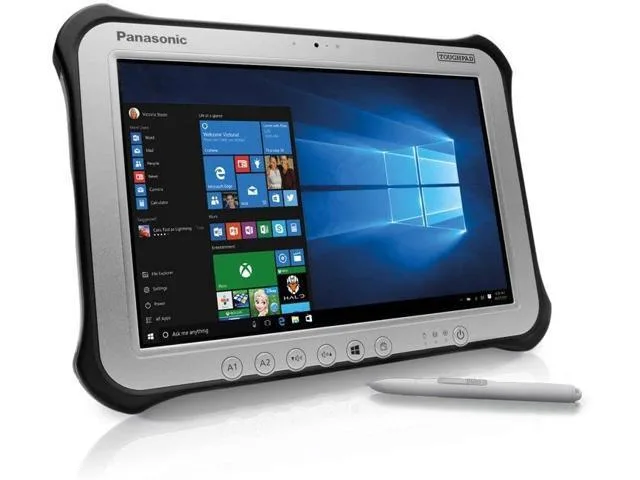
Panasonic Toughpad FZ-G1 MK4 10.1" Tablet i5-6300U 8GB 256GB SSD
- Silver
- Standard
US$230.99
0.00298861BTC
재고 있음


Panasonic
A rugged 10.1-inch Windows tablet with a daylight-readable 1920 x 1200 display, Intel Core i5-6300U processor, 8GB DDR3L memory, 128GB SSD, and pen-plus-touch input
SSD 128 GB
Option No
The Panasonic Toughpad FZ-G1 is a fully rugged Windows 10 Pro tablet built for field workforces operating outdoors. It combines an Intel Core i5-6300U vPro processor with 8GB DDR3L memory and a 128GB SSD. The 10.1" WUXGA display reaches up to 800 nits for daylight readability and supports 10-point capacitive multi-touch plus digitiser input.
This device replaces standard consumer tablets when workloads demand MIL-STD durability, a daylight-viewable screen, and integrated digitiser support for pen or glove use. The jump is worth it when teams need reliable operation in rain, dust, or bright sunlight and require Windows 10 Pro manageability with TPM 2.0 security for corporate data.
It suits mobile technicians, logistics staff, and survey crews who need a handheld Windows device with a rotating hand strap and corner guards for drop protection. Buyers who need larger internal storage, a built-in keyboard, or a lighter consumer form factor should look at something else.
| Brand | Panasonic |
|---|---|
| Series | Toughpad |
| Model | FZ-G1 |
| Part Number | FZ-G1PXXXXXX |
| Color | Silver |
| Operating System | Windows 10 Pro |
| CPU Type | Intel Core i5 6th Gen |
| Processor Name | 2.40 GHz |
| Number of Cores | Dual-core Processor |
| Touchscreen | Touch Screen |
| Display Type | Wide XGA |
| Panel | TFT IPS |
| Display Features | Daylight-viewable WUXGA Active Matrix TFT IPS colour LCD with circular polarizer (up to 800cd/m² brightness), 10 finger capacitive multi-touchscreen + digitiser (pen, finger and glove modes) |
| Resolution | 1920 x 1200 |
| GPU/VPU | Intel HD Graphics 520 |
| SSD | 128GB |
| HDD | No |
| Memory | 8GB |
| Optical Drive Type | N/A |
| LAN | N/A |
| WLAN | 802.11ac Wireless LAN |
| Bluetooth | Bluetooth 4.1 |
| HDMI | 1 x HDMI |
| Docking Connector | 1 |
| Audio Ports | 1 x Headphone/Microphone Combo Jack |
이 모델의 다른 버전
같은 제품군에서 메모리·쿨러·클럭이 다릅니다 — 결정 전에 비교해 보세요.
The tablet has a dedicated docking connector on its base for Panasonic desktop and vehicle cradles; no VESA holes are present on the unit itself.
Attach the corner guards first, then thread the rotating hand strap through its slots, and finally lower the tablet straight down onto the dock connector until the latch clicks.
Power off the tablet, slide the battery release latch on the rear, remove the old pack, insert the new battery until it clicks, and power on to calibrate.
이 진열대의 다른 상품
같은 진열대, 같은 체크아웃 — 코인 8종, 환율 잠금 30분.
결제할 코인과 가격을 확인할 통화입니다.
체크아웃 시 지갑에서 전송됩니다.
표시 전용 — 카탈로그 가격은 달러 기준입니다.
일치하는 통화가 없습니다.
사이트에서 사용할 언어를 선택하십시오.
일치하는 언어가 없습니다.
처음 방문하셨나요?
이미 계정이 있으신가요?
자동 재설정 기능은 없습니다. 이 쇼핑몰은 어떠한 메일도 보내지 않으므로 요청할 일회용 링크 자체가 없습니다. 계정에 등록된 이메일 주소를 그대로 두시면 담당자가 직접 확인해 처리합니다.
요청 접수
받은편지함으로 오는 것은 아무것도 없습니다 — 이 쇼핑몰은 메일을 전혀 보내지 않습니다. 담당자가 직접 확인해 처리합니다.
기억나셨나요?