Panasonic
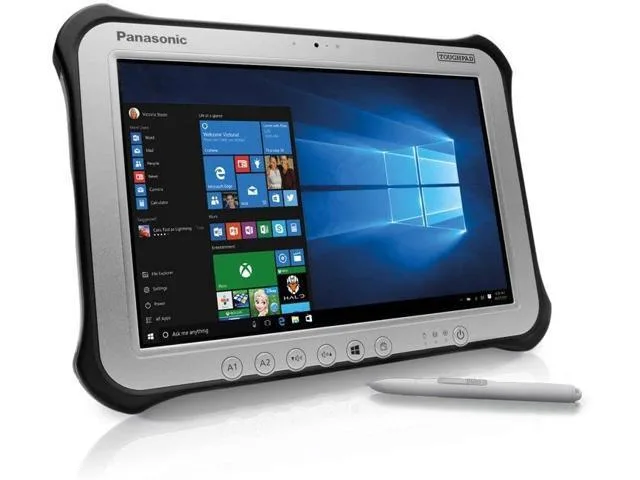
Panasonic Toughpad FZ-G1 MK4 10.1" Tablet i5-6300U 8GB 256GB SSD
- Silver
- Standard
230,99 US$
0.00297002BTC
En stockAceptamos criptomonedas — así, las criptos que usted tiene pueden comprar hardware real.Pague en cripto y gástela en hardware real. Envío asegurado gratis a nivel mundial a partir de $399. Cajas neutras, sin marca, enviadas desde Alemania.Envío asegurado gratis a partir de $399. Su cotización queda bloqueada 30 minutos en cuanto se abre el pago.Cotización bloqueada 30 minutos. Todos los artículos vienen sellados, con el número de serie verificado y cubiertos por una garantía de 24 meses.Sellado, con 24 meses de garantía.


Panasonic
A rugged 10.1-inch Windows tablet with a daylight-readable 1920 x 1200 display, Intel Core i5-6300U processor, 8GB DDR3L memory, 128GB SSD, and pen-plus-touch input
SSD 128 GB
Option No
The Panasonic Toughpad FZ-G1 is a fully rugged Windows 10 Pro tablet built for field workforces operating outdoors. It combines an Intel Core i5-6300U vPro processor with 8GB DDR3L memory and a 128GB SSD. The 10.1" WUXGA display reaches up to 800 nits for daylight readability and supports 10-point capacitive multi-touch plus digitiser input.
This device replaces standard consumer tablets when workloads demand MIL-STD durability, a daylight-viewable screen, and integrated digitiser support for pen or glove use. The jump is worth it when teams need reliable operation in rain, dust, or bright sunlight and require Windows 10 Pro manageability with TPM 2.0 security for corporate data.
It suits mobile technicians, logistics staff, and survey crews who need a handheld Windows device with a rotating hand strap and corner guards for drop protection. Buyers who need larger internal storage, a built-in keyboard, or a lighter consumer form factor should look at something else.
| Brand | Panasonic |
|---|---|
| Series | Toughpad |
| Model | FZ-G1 |
| Part Number | FZ-G1PXXXXXX |
| Color | Silver |
| Operating System | Windows 10 Pro |
| CPU Type | Intel Core i5 6th Gen |
| Processor Name | 2.40 GHz |
| Number of Cores | Dual-core Processor |
| Touchscreen | Touch Screen |
| Display Type | Wide XGA |
| Panel | TFT IPS |
| Display Features | Daylight-viewable WUXGA Active Matrix TFT IPS colour LCD with circular polarizer (up to 800cd/m² brightness), 10 finger capacitive multi-touchscreen + digitiser (pen, finger and glove modes) |
| Resolution | 1920 x 1200 |
| GPU/VPU | Intel HD Graphics 520 |
| SSD | 128GB |
| HDD | No |
| Memory | 8GB |
| Optical Drive Type | N/A |
| LAN | N/A |
| WLAN | 802.11ac Wireless LAN |
| Bluetooth | Bluetooth 4.1 |
| HDMI | 1 x HDMI |
| Docking Connector | 1 |
| Audio Ports | 1 x Headphone/Microphone Combo Jack |
Otras versiones de este modelo
Misma familia, con memoria, disipador o frecuencia diferentes — compare antes de decidirse.
The tablet has a dedicated docking connector on its base for Panasonic desktop and vehicle cradles; no VESA holes are present on the unit itself.
Attach the corner guards first, then thread the rotating hand strap through its slots, and finally lower the tablet straight down onto the dock connector until the latch clicks.
Power off the tablet, slide the battery release latch on the rear, remove the old pack, insert the new battery until it clicks, and power on to calibrate.
También en este pasillo
Mismo estante, mismo pago — ocho criptomonedas y un tipo de cambio fijado 30 minutos.
Lo que usted paga, y la moneda en la que lee los precios.
Se envía desde su billetera al finalizar la compra
Solo informativo — el catálogo está en dólares
Ninguna moneda coincide.
Elija el idioma en el que el sitio le habla.
Ningún idioma coincide.
¿Es nuevo aquí?
¿Ya tiene una?
No existe ningún restablecimiento automático: esta tienda no envía correos electrónicos, así que no hay ningún enlace de un solo uso que solicitar. Deje la dirección asociada a la cuenta y se atenderá de forma manual.
Solicitud registrada
No hay nada de camino a su bandeja de entrada: esta tienda no envía correos en absoluto. Alguien se encarga de esto manualmente.
¿La recordó?