Panasonic
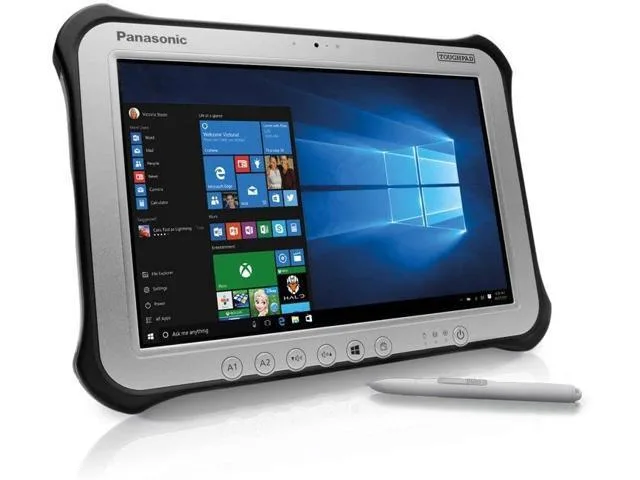
Panasonic Toughpad FZ-G1 MK4 10.1" Tablet i5-6300U 8GB 256GB SSD
- Silver
- Standard
US$230.99
0.0030205BTC
現貨


Panasonic
A rugged 10.1-inch Windows tablet with a daylight-readable 1920 x 1200 display, Intel Core i5-6300U processor, 8GB DDR3L memory, 128GB SSD, and pen-plus-touch input
SSD 128 GB
Option No
The Panasonic Toughpad FZ-G1 is a fully rugged Windows 10 Pro tablet built for field workforces operating outdoors. It combines an Intel Core i5-6300U vPro processor with 8GB DDR3L memory and a 128GB SSD. The 10.1" WUXGA display reaches up to 800 nits for daylight readability and supports 10-point capacitive multi-touch plus digitiser input.
This device replaces standard consumer tablets when workloads demand MIL-STD durability, a daylight-viewable screen, and integrated digitiser support for pen or glove use. The jump is worth it when teams need reliable operation in rain, dust, or bright sunlight and require Windows 10 Pro manageability with TPM 2.0 security for corporate data.
It suits mobile technicians, logistics staff, and survey crews who need a handheld Windows device with a rotating hand strap and corner guards for drop protection. Buyers who need larger internal storage, a built-in keyboard, or a lighter consumer form factor should look at something else.
| Brand | Panasonic |
|---|---|
| Series | Toughpad |
| Model | FZ-G1 |
| Part Number | FZ-G1PXXXXXX |
| Color | Silver |
| Operating System | Windows 10 Pro |
| CPU Type | Intel Core i5 6th Gen |
| Processor Name | 2.40 GHz |
| Number of Cores | Dual-core Processor |
| Touchscreen | Touch Screen |
| Display Type | Wide XGA |
| Panel | TFT IPS |
| Display Features | Daylight-viewable WUXGA Active Matrix TFT IPS colour LCD with circular polarizer (up to 800cd/m² brightness), 10 finger capacitive multi-touchscreen + digitiser (pen, finger and glove modes) |
| Resolution | 1920 x 1200 |
| GPU/VPU | Intel HD Graphics 520 |
| SSD | 128GB |
| HDD | No |
| Memory | 8GB |
| Optical Drive Type | N/A |
| LAN | N/A |
| WLAN | 802.11ac Wireless LAN |
| Bluetooth | Bluetooth 4.1 |
| HDMI | 1 x HDMI |
| Docking Connector | 1 |
| Audio Ports | 1 x Headphone/Microphone Combo Jack |
其他版本
同系列產品,記憶體、散熱器或時脈不同 — 下單前請先比較。
The tablet has a dedicated docking connector on its base for Panasonic desktop and vehicle cradles; no VESA holes are present on the unit itself.
Attach the corner guards first, then thread the rotating hand strap through its slots, and finally lower the tablet straight down onto the dock connector until the latch clicks.
Power off the tablet, slide the battery release latch on the rear, remove the old pack, insert the new battery until it clicks, and power on to calibrate.
同類商品
同一分類,同一套結帳流程 — 支援八種加密貨幣,匯率鎖定 30 分鐘。
您支付所用的幣種,以及查看價格所用的貨幣。
結帳時由您的錢包發送
僅供顯示 — 商品目錄以美元計價
查無符合的貨幣。
請選擇網站使用的語言。
查無符合的語言。
初次造訪?
已經有帳戶了嗎?
本店沒有自動重設密碼的機制:由於不寄送電子郵件,也就沒有一次性連結可供申請。只要將地址留在帳戶中,之後將由專人處理。
請求已收到
不會有任何郵件寄到您的信箱 — 本商店完全不寄送電子郵件。會有人親自處理這些申請。
想起來了嗎?