partaker
partaker PA-3046 desktop PC Intel Core i5-8265U 16GB DDR4 256GB Windows 10 Pro
- Business Desktops &…
- Gray
$600.99
0.00765329BTC
In stockWe take cryptocurrency — so the coins you hold can buy real hardware.Pay in crypto, spend it on real hardware. Free insured shipping worldwide over $399. Plain, unbranded boxes, sent from Germany.Free insured shipping over $399. Your rate is locked for 30 minutes once checkout opens.Rate locked 30 minutes. Every item sealed, serial-checked and covered by a 24-month warranty.Sealed, 24-month warranty.


partaker
Fanless industrial mini PC with an Intel Core i5-8265U, 32 GB DDR4, 1 TB SSD, four LAN ports and 9–36 V power input
Memory Capacity 32GB DDR4
SSD 1TB
HDD None
Struck-through versions exist but are not stocked here.
The Partaker PA-3046 is a compact desktop computer built around an onboard Intel Core i5-8265U processor with four cores and eight threads. It ships with 32GB of DDR4 memory and a 1TB SATA SSD, running Windows 10 Pro out of the box. The aluminium alloy chassis acts as a heatsink, making the system completely silent in operation. It targets industrial automation, data acquisition and embedded deployments where space and noise are constrained.
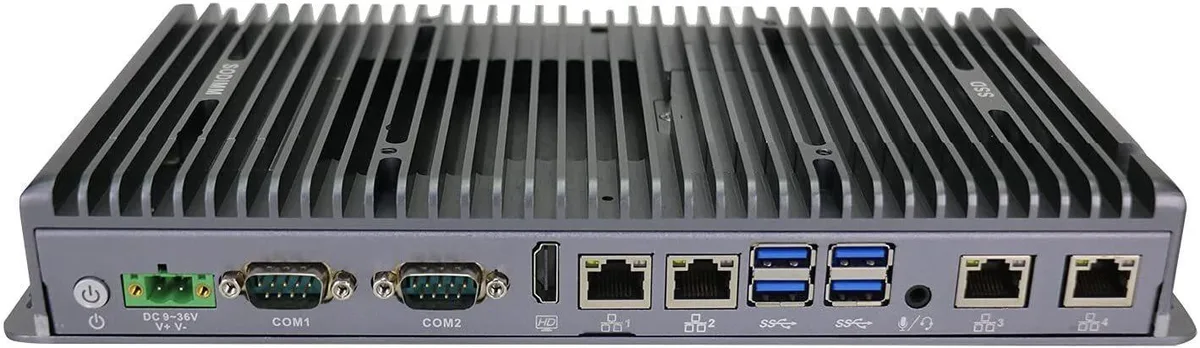
A 9-36V Phoenix connector powers the unit, allowing direct connection to vehicle or industrial DC supplies without an external brick. Video output uses one VGA and one HDMI port for synchronous or asynchronous dual displays. Four Intel I211-AT Gigabit LAN ports, four USB 3.0 ports and four COM ports with RS232/RS422/RS485 options provide extensive wired connectivity for sensors, PLCs and serial equipment. Internal expansion includes an M.2 2280 M-key slot for SATA storage and a Mini PCIe slot with a SIM socket for wireless modules.
The fanless design eliminates moving parts, so acoustic output is zero and dust ingress is minimised. The i5-8265U runs at a 1.6GHz base frequency with a 3.9GHz maximum turbo, keeping thermal output low enough for the aluminium case to dissipate heat passively. Power consumption stays modest across typical industrial workloads, and the wide input range tolerates voltage fluctuations common in mobile or factory environments. TPM 2.0 and AES-NI are supported for hardware-level security.
| Type | Business Desktops & Workstations |
|---|---|
| Color | Gray |
| Monitor | Monitor not included |
| Operating System | Windows 10 Pro |
| Windows 11 | Ready |
| CPU Type | Intel Core i5 8th Gen |
| CPU Name | Intel Core i5-8265U |
| GPU/VGA Type | Intel UHD Graphics |
| Memory Capacity | 32GB DDR4 |
| SSD | 1TB |
| HDD | No |
| Screen Size | No Screen |
Other versions of this model
Same family, different memory, cooler or clock — compare before you commit.
Each port is a Gigabit Ethernet link, so real‑world throughput tops out near 1 Gbps per port; the four ports give four independent 1 Gbps channels.
The fanless titanium‑gray aluminium chassis is designed for DIN‑rail or wall mounting in industrial cabinets; allow clearance around the 2‑pin phoenix power connector and four LAN ports.
Insert the M.2 2280 SATA SSD into the M‑Key slot at a 30° angle, press flat, and secure with the retaining screw; the step often missed is enabling the SATA controller in BIOS before the OS sees the drive.
Also in this aisle
Same shelf, same checkout — eight coins and a 30-minute rate lock.
What you pay in, and what you read prices in.
Sent from your wallet at checkout
Display only — the catalogue is priced in USD
No currency matches that.
Pick the language the site speaks to you in.
New here?
Already have one?
There is no automatic reset: this shop sends no mail, so there is no one-time link to ask for. Leave the address on the account and it gets picked up by hand.
Request noted
Nothing is on its way to your inbox — this shop sends no mail at all. Someone picks these up by hand.
Remembered it?