DELL
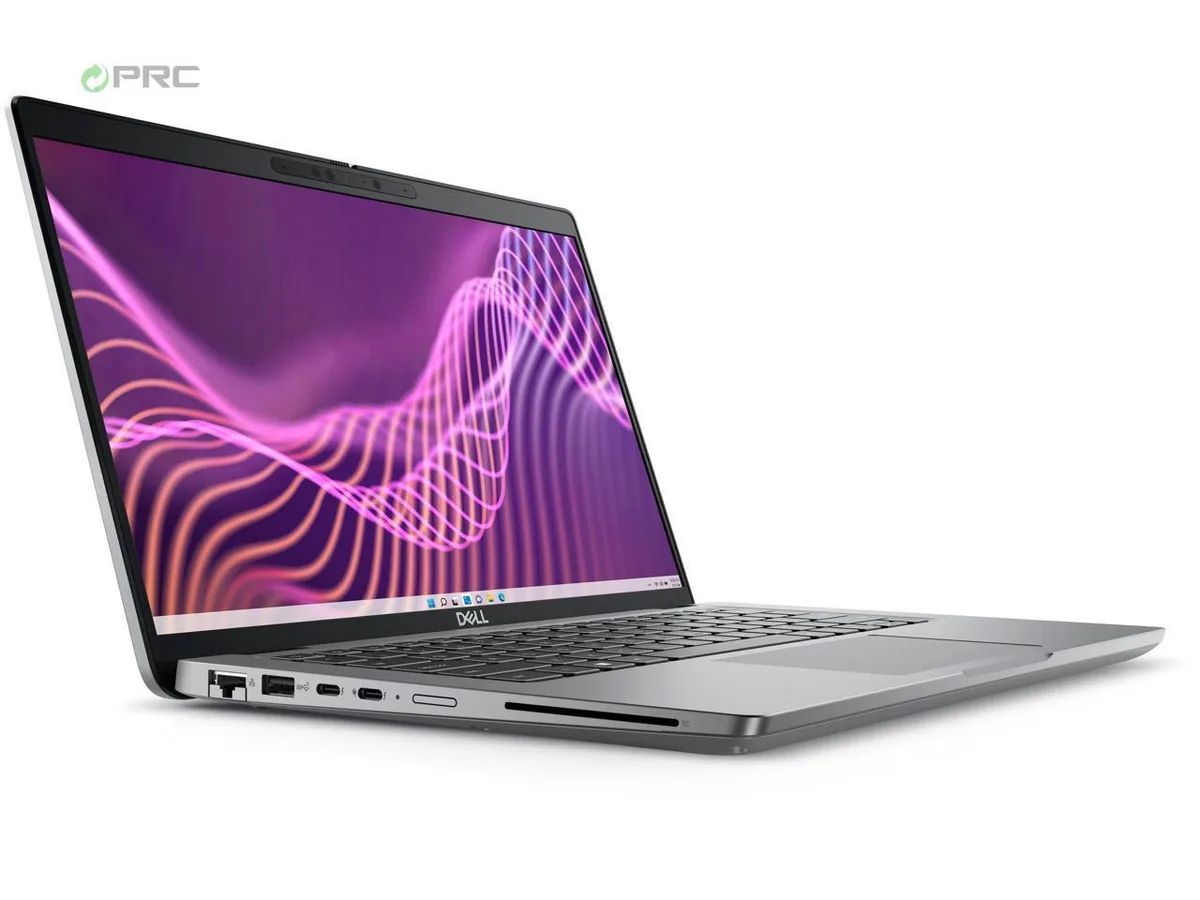
DELL Latitude 3440 14" FHD i5-1335U 16GB DDR4 256GB NVMe Windows 11 Pro
- Gray
- Windows 11 Pro
US$421.99
0.00545524BTC
現貨


DELL
A 14-inch business laptop with a 13th Gen Intel Core i5-1335U, 8 GB DDR4, 256 GB NVMe, FHD display and Windows 11 Pro
Options i5-1335U 8GB/256GB W11P
The DELL Latitude 3440 is a 14.0-inch business laptop built around a 13th Gen Intel Core i5-1335U processor with 10 cores and 12 threads. It ships with 8 GB of DDR4 memory and a 256 GB NVMe SSD running Windows 11 Pro. The configuration suits office professionals and students who need reliable productivity performance in a portable 1.54 kg chassis.
The system operates with a 65 W AC adapter and integrates Intel Iris Xe graphics alongside the CPU. In typical office workloads the cooling solution manages heat without excessive fan noise, while the anti-glare 250-nit display remains comfortable for extended use. Integrated graphics and efficient DDR4 memory help keep power draw modest during everyday tasks like document editing and video calls.
Under sustained multi-threaded workloads the 10-core hybrid architecture balances performance and efficiency cores up to 4.6 GHz and 3.4 GHz respectively. The 12 MB cache supports data throughput during prolonged compile, render or analysis sessions. Thermal management maintains stable clocks within the slim 18.6 mm rear profile without throttling aggressively during long runs.
| Brand | DELL |
|---|---|
| Series | 3000 |
| Model | Latitude |
| Part Number | 3440 |
| Color | Gray |
| Operating System | Windows 11 Pro |
| CPU Type | Intel Core i5 13th Gen |
| Processor Name | Intel Core i5-1335U |
| CPU L2 Cache | 6MB |
| Screen Size | 14.0" |
| Touchscreen | Non-Touch Screen |
| Display Type | FHD |
| Resolution | 1920 x 1080 |
| GPU/VPU | Intel Iris Xe Graphics |
| Graphic Type | Integrated Card |
| SSD | 256GB |
| HDD | No |
| Storage Spec | 256 GB SSD |
| Memory | 8GB |
| Memory Speed | DDR4 |
| Memory Spec | 4 GB x 2 |
| Memory Slot (Total) | 2 |
| Memory Slot (Available) | 0 |
| Max Memory Supported | 64 GB |
| Optical Drive Type | No |
| LAN | 10/100/1000Mbps |
| WiFi Generation | Wi-Fi 6 |
| Bluetooth | Yes |
| USB | 1 x USB-C Gen 2, 3 x USB-A (3.0/3.2) Gen 1, |
| Video Port | 1 x HDMI 1.4 |
| HDMI | 1 x HDMI |
| Audio Ports | 1 x Microphone Jack, 1 x Headphone Jack |
| Audio | Integrated Sound card |
| Touchpad | Yes |
| Keyboard | Standard |
| Webcam | Yes |
| Style | Ultrabook |
| Type | Mainstream |
| Usage | Consumer |
| AC Adapter/Charger | 65-watt AC Adapter |
| Weight | 3 - 3.9 lbs. |
其他版本
同系列產品,記憶體、散熱器或時脈不同 — 下單前請先比較。
Remove the base cover, insert the DDR4 SO-DIMM at an angle until the clips snap, then reassemble; the step often missed is pressing the module down firmly until both retention clips click audibly.
The 65 W AC adapter and the internal battery are the parts most likely to require replacement before the chassis or motherboard.
The 65 W power adapter caps total system draw, so the CPU throttles to stay within that envelope before temperature becomes the limiting factor.
同類商品
同一分類,同一套結帳流程 — 支援八種加密貨幣,匯率鎖定 30 分鐘。
您支付所用的幣種,以及查看價格所用的貨幣。
結帳時由您的錢包發送
僅供顯示 — 商品目錄以美元計價
查無符合的貨幣。
請選擇網站使用的語言。
查無符合的語言。
初次造訪?
已經有帳戶了嗎?
本店沒有自動重設密碼的機制:由於不寄送電子郵件,也就沒有一次性連結可供申請。只要將地址留在帳戶中,之後將由專人處理。
請求已收到
不會有任何郵件寄到您的信箱 — 本商店完全不寄送電子郵件。會有人親自處理這些申請。
想起來了嗎?