

SanDisk
SanDisk Cruzer Blade 8 GB USB 2.0 USB flash drive Black SDCZ50-008G-B35
US$391.99
0.00500875BTC
現貨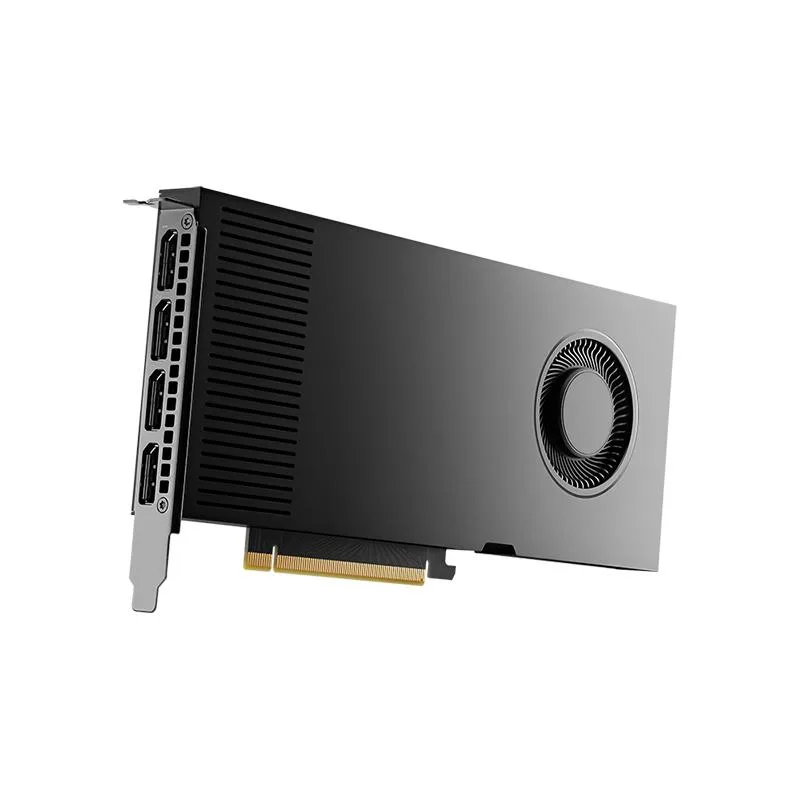
NVIDIA
Workstation GPU with 20 GB GDDR6 memory, PCIe 4.0 x16 interface, four DisplayPort outputs, and included power and HDMI adapters
The NVIDIA RTX 4000 Ada is a workstation graphics card equipped with 20GB of GDDR6 memory. It connects via a PCIe 4.0 x16 interface and provides four DisplayPort outputs. The retail package includes the board, a quick start guide, a support guide, an 8-pin to CEM5 16-pin power dongle, and a DP 1.4 to HDMI 2.0 adapter.
This card replaces workstation GPUs with smaller frame buffers when 20GB of GDDR6 memory is required for large datasets or multi-display setups. The jump is worth it when current hardware limits texture resolution, model complexity, or simultaneous 4K outputs. It is not for buyers who need consumer gaming features or single-slot form factors.
| Brand | NVIDIA |
|---|---|
| Model | 900-5G190-2570-000 |
| Memory Type | Computer Accessories |
It installs in a PCIe 4.0 x16 slot and draws power through the included 8-pin to 16-pin CEM5 dongle; plug the dongle firmly into the card before seating the board.
Many forget to connect the supplied 8-pin to CEM5 16-pin power dongle to the card before closing the case, leaving the GPU without power.
同類商品
同一分類,同一套結帳流程 — 支援八種加密貨幣,匯率鎖定 30 分鐘。
您支付所用的幣種,以及查看價格所用的貨幣。
結帳時由您的錢包發送
僅供顯示 — 商品目錄以美元計價
查無符合的貨幣。
請選擇網站使用的語言。
查無符合的語言。
初次造訪?
已經有帳戶了嗎?
本店沒有自動重設密碼的機制:由於不寄送電子郵件,也就沒有一次性連結可供申請。只要將地址留在帳戶中,之後將由專人處理。
請求已收到
不會有任何郵件寄到您的信箱 — 本商店完全不寄送電子郵件。會有人親自處理這些申請。
想起來了嗎?



