

SanDisk
SanDisk Cruzer Blade 8 GB USB 2.0 USB flash drive Black SDCZ50-008G-B35
391.99 US$
0.00502107BTC
متوفرنقبل الدفع بالعملة المشفرة — لذلك يمكن للعملات الرقمية التي تملكها أن تشتري أجهزة حقيقية.ادفع بالعملة المشفرة، وأنفقها على أجهزة حقيقية. شحن مؤمن مجانا إلى كل أنحاء العالم لما يتجاوز 399 US$. صناديق شحن بسيطة بلا علامة تجارية، ترسل من ألمانيا.شحن مؤمن مجانا لما يتجاوز 399 US$. يُقفل سعرك لمدة 30 دقيقة بمجرد فتح صفحة الدفع.السعر مقفل لمدة 30 دقيقة. كل قطعة مختومة، ورقمها التسلسلي متحقق منه، ومشمولة بضمان 24 شهرا.مختوم، وبضمان 24 شهرا.


DELL
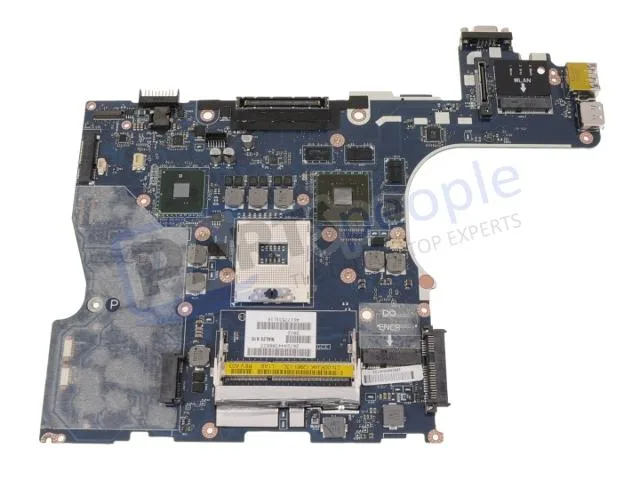
Genuine Dell Precision M4500 laptop motherboard with discrete Nvidia graphics, CPU and memory not included
This is a genuine Dell OEM system board built for the Precision M4500 laptop. It arrives with discrete Nvidia graphics already integrated on the board. The processor and memory modules are not included and must be sourced separately.
The board relies on the laptop's original cooling assembly to manage heat from the CPU and discrete GPU. Power draw follows the factory specification for the M4500 platform. Acoustic output matches the standard fan profile designed for this chassis.
| Brand | DELL |
|---|
Remove the battery, disconnect all cables, unscrew the old board, transfer the CPU and heat sink, seat the new board, reconnect cables, and refit screws. The step most often missed is reapplying thermal paste on the CPU and GPU dies before mounting the heat sink.
The CMOS coin cell will eventually lose charge and should be replaced when the system loses date or BIOS settings. The discrete Nvidia graphics chip is soldered to the board, so a GPU failure means replacing the entire motherboard.
أيضًا في هذا القسم
نفس القسم، ونفس صفحة الدفع — ثماني عملات رقمية وقفل سعر لمدة 30 دقيقة.
ما تدفعه، وما تُعرض به الأسعار.
يُرسَل من محفظتك عند إتمام الطلب
للعرض فقط — أسعار الكتالوج بالدولار الأمريكي
لا توجد عملة مطابقة.
اختر اللغة التي يخاطبك بها الموقع.
لا توجد لغة مطابقة.
هل أنت جديد هنا؟
لديك حساب بالفعل؟
لا توجد إعادة تعيين تلقائية: هذا المتجر لا يُرسل أي بريد، فلا يوجد رابط لمرة واحدة يمكن طلبه. اترك العنوان في الحساب، وسيُعالَج الأمر يدويًا.
تم تسجيل الطلب
لا شيء في طريقه إلى بريدك الوارد — هذا المتجر لا يُرسل أي بريد إطلاقًا. يتولّى أحدهم معالجة هذه الطلبات يدويًا.
تذكّرتها؟



